

Quick Summary
- Best overall for families with school-age kids: Sense - reads the school emails, flyers and WhatsApp messages you send it and runs the calendar, chores, meals and lists in one place
- Best for meal planning: Cozi - familiar and good at the weekly dinner plan, with email import only on the $79.99 Max tier
- Best dedicated wall screen: Skylight - a nice piece of hardware, but most of the smart features need Plus at $79 a year
- Best for location sharing: FamilyWall - calendar, lists and a family locator in one app
- Best free option: Google Calendar - free and already on your phone, but you type everything in
By the second week of school, the family calendar is not the problem. The inbox is. The six-page newsletter with picture day in paragraph four. The ParentSquare post about early dismissal. The coach's email that moves Saturday's game to 10:30. The birthday invite in the backpack. The class group chat asking who signed up for snacks. Then someone at dinner asks what is happening this week, and the only place the answer lives is your head.
That is the test we used. Not "which app has the prettiest calendar," but which one gets the week out of your head and in front of the whole family with the least typing. We make Sense, so this is not a neutral review. What we can do is be specific about what each app does, what it costs in US dollars, and where each one is the better choice. Prices were checked on each company's site or the US App Store on November 15, 2026.
Quick Comparison
| App | Price (USD) | Best For | Adds events from school emails? |
|---|---|---|---|
| Sense | Free / $6.99/mo or $59.99/yr per household | One plan the whole family sees, filled from email, photos and WhatsApp | Yes - 10 a month free, unlimited on Premium |
| Cozi | Free with ads / Gold $39/yr / Max $79.99/yr | Meal planning and lists | Cozi Max only (AI Event Import) |
| Skylight | Screens from $149.99 + Plus $79/yr | A dedicated kitchen wall screen | Plus only (Magic Import) |
| FamilyWall | Free / Premium $4.99/mo or $44.99/yr | Location sharing | Not listed on its pricing page |
| Fambot | Free in beta, pricing not announced | A nightly plan by text, built from your inbox | Yes - scans your connected Gmail or Outlook |
| TimeTree | Free with ads / Premium $4.49/mo or $44.99/yr | Separate shared calendars for different groups | No |
| Google Calendar | Free | Already on your phone | Only flight, reservation and ticket confirmations from Gmail |
US prices checked November 15, 2026 on cozi.com and the US App Store (Cozi), myskylight.com (Skylight), familywall.com (FamilyWall), timetreeapp.com (TimeTree) and fambot.com (Fambot). Store prices can change and may differ by region.
Forward One School Email, See What Happens
Sense reads the newsletter and puts every date on your family calendar under the right kid. Free to start, no credit card.
Try Sense online

The 7 Best Family Organizer Apps in 2026
1. Sense - Best for Families Buried in School and Activity Emails
This is our app, so take the ranking with that in mind. Here is the case for it: Sense is the only app on this list that reads what the school, the coach and the class chat send you, puts it on a calendar the whole family shares, and then runs the rest of the house from the same place. Think of it as an AI chief of staff for the whole household, not just a nicer place to type.
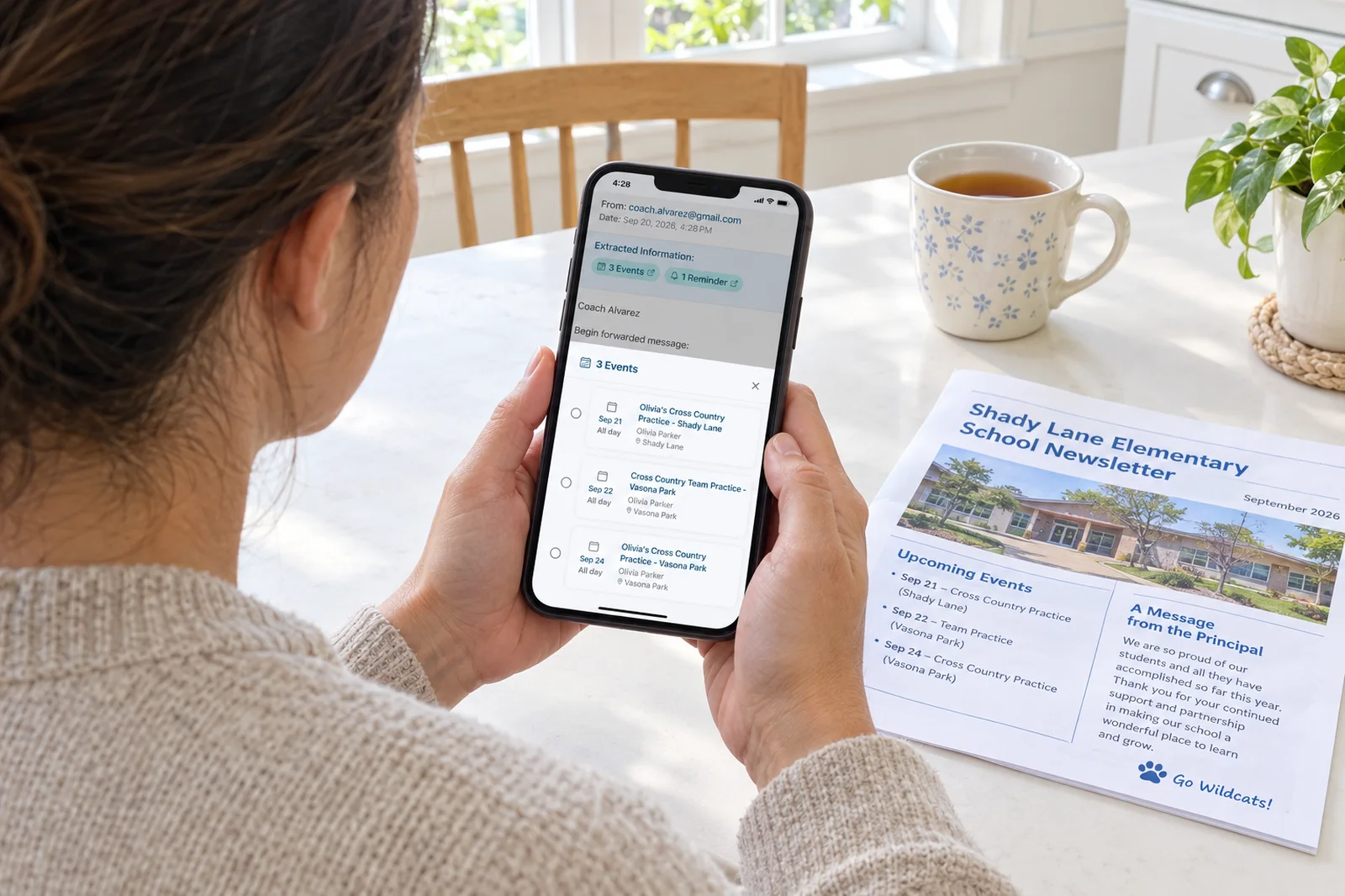
Forward the newsletter to your Sense address and every date in it, from picture day to the early release Friday, lands on the shared calendar under the right kid, linked back to the email it came from. Snap the soccer schedule on the fridge, share a camp PDF, or forward the "game moved to 10:30" message to Sense in WhatsApp, and it does the same. Set up auto-forwarding for the school and team senders that matter and you stop forwarding at all. Sense never connects to your inbox; it only reads what you send it.
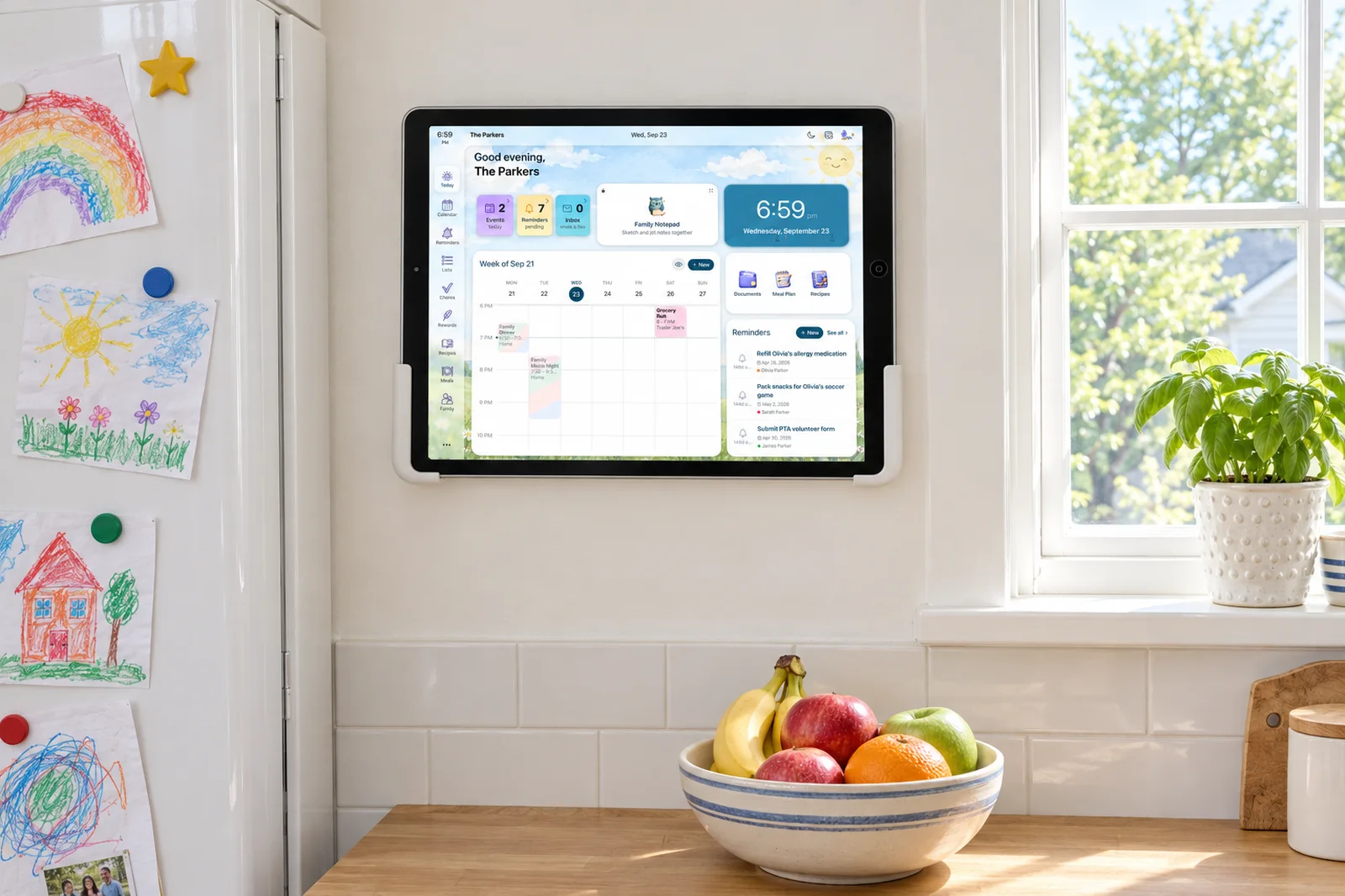
The calendar is where it starts. Reminders attach to the event and move when it moves. "Bring oranges" goes on the shared list. A morning digest tells everyone what they have today, and a schedule-change alert goes out when an email says practice is cancelled. Ask Sense "what does Emma have Thursday?" and get an answer from your calendar, or tell it to move piano to Wednesday. Premium adds chores with rewards and allowance, morning and bedtime routines, meal planning, medications, and Sense Hub, which turns an old iPad or Android tablet into the family screen on the counter.
One back-to-school newsletter is a good first test. Forward it and count the events Sense creates against the ones you would have typed in yourself. Most parents find dates they had already missed.
Strengths
- Reads emails, photos, PDFs, screenshots and WhatsApp messages you send it
- No inbox connection needed
- Chores, routines, rewards, allowance, meals and lists in the same app
- Kid Mode screen for each kid, and Sense Hub on a tablet you own
- Two-way Google Calendar sync; iPhone, Android and web
- 4.8 on the App Store
Limitations
- A newer app from a small team
- You forward things, or set up auto-forwarding once
- Free plan caps AI actions at 10 a month for the family
- Chores, meal planning and the Hub are Premium
Free to Start, No Credit Card
Forward your first school email tonight and see what lands on the calendar.
Try Sense online
2. Cozi - Best for Meal Planning
Cozi is the family organizer most American parents have tried at least once. It covers the basics well: a shared color-coded calendar, shopping lists, to-do lists, and a recipe box that turns a weekly meal plan into a grocery list. If "what's for dinner?" is the daily 4pm crisis, Cozi still handles it as well as anything.
The free version shows ads. Cozi Gold, $39 a year, removes them and, in Cozi's words, lets you see more of your own calendar and lists. Cozi Max, $79.99 a year, adds AI Event Import, which turns invitations and event details from your inbox into calendar events. That closes part of the gap with AI-first apps, but it costs more than Sense Premium and there are no chores, rewards or kid screens. More on Cozi alternatives.
Strengths
- Familiar and long-established
- Strong meal planning and recipe box
- Shared lists that work well at the store
Limitations
- Free version shows ads
- Email import needs the $79.99 Max tier
- No chores, rewards or kid screens
3. Skylight Calendar - Best Dedicated Wall Screen
Skylight is the touchscreen calendar you see on kitchen walls on Instagram, and it is a good piece of hardware. The family calendar shows on a screen everyone walks past, kids can tick off chores on it, and it syncs with the calendars you already use.
The catch is that most of the smart features sit behind Skylight Plus at $79 a year: Magic Import with Sidekick (events from emails and photos), meal planning, rewards, and the photo and video screensaver. So the real first-year cost of a Calendar 2 with Plus is about $379 before tax. If you already have an iPad or Android tablet in a drawer, Sense Hub gives you the same kind of counter screen as part of Sense Premium. What Skylight Plus costs and includes.
Strengths
- Purpose-built, always-on wall screen
- Easy for kids and grandparents to read
- Several sizes, including a 10-inch model
Limitations
- Hardware cost on top of the subscription
- Email and photo import, meals and rewards need Plus
- The screen is in one room
4. FamilyWall - Best for Location Sharing
FamilyWall puts a shared calendar, shopping and to-do lists, a family messenger and a contact book in its free plan. Premium adds the parts that make it different: a family locator with place alerts (similar to Life360), a meal planner and recipe box, a budget tracker, documents, Google and Outlook.com sync, and no ads.
For families with teenagers who take the bus to practice or walk to a friend's house, the locator is the main reason to pick it. The calendar itself is fine, but you are still the one entering what the school sends. Sense vs FamilyWall.
Strengths
- Family locator and place alerts on Premium
- Generous free plan for calendar and lists
- Meal planner, budget and documents in one app
Limitations
- Calendar sync and the locator are Premium
- Events from school emails are typed in by hand
- No chores or rewards for kids
5. Fambot - Best for a Nightly Plan by Text
Fambot is the newest app here and takes a different approach. You connect Gmail or Outlook and your calendar once, and it reads your inbox for school, activity and family details. Then it sends you a daily digest of what you need to know, do and decide, by text, email or both, and you can text it back to ask a question or make a change. It also supports WhatsApp groups and decodes school newsletters.
If your problem is not noticing the email in the first place, connect-once is a real advantage. The trade is inbox access, and the output is a plan for the parents rather than a shared household system: its site lists no chores, meal planning, kid screens or kitchen display. Sense vs Fambot.
Strengths
- No forwarding: it reads your connected inbox
- Daily plan by text or email, and you can text back
- Free while in beta
Limitations
- Needs read access to your inbox
- Price after beta not yet announced
- No chores, meals, kid screens or wall display
6. TimeTree - Best for Separate Shared Calendars
TimeTree is a clean, simple shared calendar built around groups. You can keep one calendar for the family, another for the soccer team and another for the grandparents, and filter between them. Each event has its own comment thread, which is handy for "who is driving?" conversations.
Premium removes ads and adds file attachments, a vertical view and prioritized events. There is no email or photo import, so every date still gets typed in by someone. Sense vs TimeTree.
Strengths
- Easy group calendars with filters
- Comments on each event
- Free version is usable
Limitations
- Free version shows ads
- No email, photo or PDF import
- Calendar only: no chores, meals or lists
7. Google Calendar - Best Free Option
Google Calendar is free, reliable and already on most phones. If you set up a Google family group, everyone in it gets a shared Family calendar automatically. For families who are disciplined about typing things in, it does the job.
It does not read school newsletters. Gmail only adds events to Google Calendar for confirmations like flights, hotel and restaurant reservations, and ticketed events. There are no chores, meal plans or kid screens. Many families keep Google Calendar and add an app that fills it: Sense syncs two ways with Google Calendar, so the practice schedule lands where your partner already looks. Sense vs Google Calendar.
Strengths
- Free, fast and familiar
- Shared Family calendar with a Google family group
- Works with almost everything
Limitations
- Everything from school is typed in by hand
- Not built for kids, chores or meals
- No family display mode
Still deciding? Try Sense free and forward your next school email to it.
How to Choose
Where does your schedule come from?
If most of your family's dates arrive by email, PDF, flyer or group chat, pick an app that reads them: Sense, Fambot, or the paid tiers of Cozi and Skylight. If your schedule is mostly recurring and you know it by heart, a free shared calendar may be enough.
Who needs to see it?
A plan in one parent's text messages does not stop the "what's happening this week?" question. If you want your partner, the kids and a sitter to see the same thing, pick something shared: Sense on every phone and a kitchen tablet, Skylight on the wall, or a shared Google Calendar.
Do you want the inbox connected?
Fambot reads your whole inbox so you never forward anything. Sense only reads what you send it, and auto-forwarding rules make that hands-off for the senders that matter. Both are reasonable; decide how much access you are comfortable giving.
Is it only a calendar?
If you also want chores with rewards, an allowance, meal plans, grocery lists and a screen for each kid, you want a full family organizer rather than a calendar app. On this list, Sense covers all of it; Cozi and FamilyWall cover meals and lists; Skylight covers chores and rewards with Plus.
What will it cost in a year?
Sense Premium is $59.99 a year for the household. Cozi Max is $79.99. FamilyWall Premium is $44.99. A Skylight Calendar 2 with Plus is about $379 in the first year. Google Calendar is free.
The Bottom Line
The hard part of running a family is not the calendar. It is reading everything that comes in, turning it into dates and to-dos, and getting the rest of the family to see it. If that is you, start with Sense: forward one school email tonight and see what lands on the calendar by morning. If meal planning is the real pain, Cozi is a solid choice. If you want a screen on the wall and do not mind the price, Skylight is well made. And if your week is simple, Google Calendar is free and fine.
Frequently Asked Questions
What is the best family organizer app in 2026?
For a family with school-age kids, Sense, because it reads the school and activity emails, photos, PDFs and WhatsApp messages you send it and puts the dates on a shared calendar under the right kid, then runs chores, meals, lists and reminders in the same app. Cozi is the pick if meal planning matters most, Skylight if you want a dedicated wall screen and will pay for it, and Google Calendar if you only need a free shared calendar. We make Sense, so weigh that.
Is there a free family organizer app?
Yes. Google Calendar is free and a Google family group gets a shared Family calendar. Sense has a free plan with a shared calendar, reminders, lists and 10 AI actions a month for the whole family. Cozi, FamilyWall and TimeTree have free versions with ads. Fambot is free while it is in beta.
Which family organizer app reads school emails?
Sense reads any email you forward to it, including newsletters and PDFs, and you can auto-forward school senders. Fambot connects to Gmail or Outlook and scans the inbox. Cozi Max ($79.99 a year) has AI Event Import, and Skylight Plus ($79 a year) has Magic Import. Google Calendar only adds events from Gmail for confirmations such as flights, reservations and tickets, not school newsletters.
How much does Sense cost?
Sense is free with a shared family calendar, reminders, lists and 10 AI actions a month. Premium is $6.99 a month or $59.99 a year for the whole household, with unlimited AI capture plus chores, meal planning, medications, allowance and the Sense Hub kitchen display. No per-person pricing. Pricing.
Do I need a Skylight to have a family calendar on the wall?
No. Sense Hub, part of Sense Premium, turns an iPad (iPadOS 15.1 or later) or Android tablet (Android 7 or later) you already own into an always-on family display. Skylight sells dedicated screens from $149.99 for the 10-inch model and $299.99 for the 15-inch Calendar 2, and the email import, meal planning and rewards need Skylight Plus at $79 a year.
2 Minutes to Set Up, Free to Try
Forward a school newsletter or the coach's email. Watch the dates appear on your shared family calendar.
Try Sense online
Free to start. No credit card required.
Related reading: Best AI family organizer apps 2026 · Best family calendar apps 2026 · Best chore and allowance apps for kids · What an AI chief of staff for families does