AI chief of staff for families

An AI chief of staff for your family that does the work, not just the briefing.

A good chief of staff reads everything that comes in, keeps the calendar, tells you what changed before you ask, and hands each task to the right person. Sense does that job for your house. Forward the school email, the coach's message, or a photo of the flyer, and it lands on the shared family calendar under the right kid, with the chores, lists, meals, and reminders around it. Free on iPhone, Android, and web.

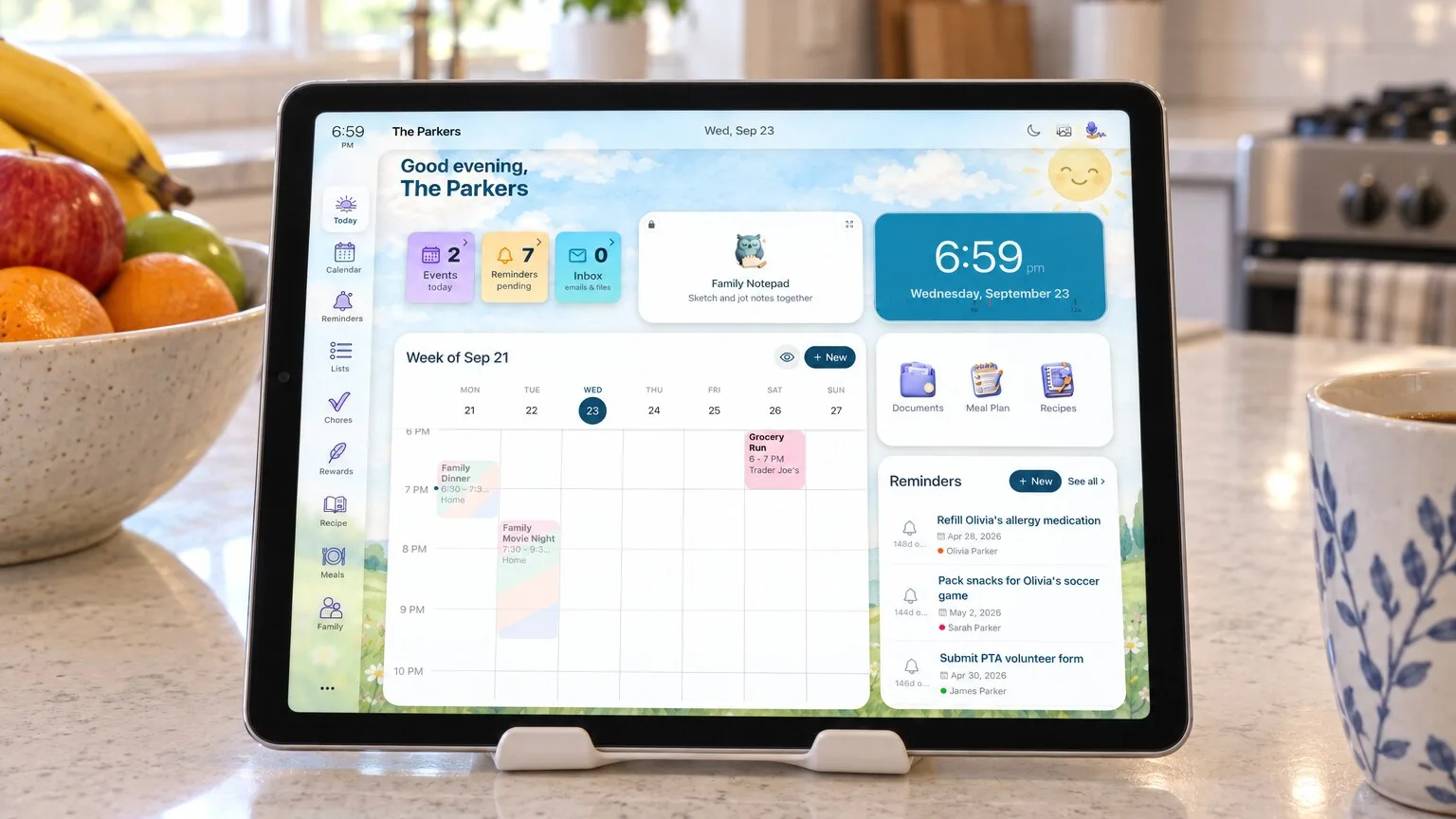
A tablet on the kitchen counter showing the family's day in Sense Hub

What the job actually is

Six things a chief of staff does. Sense does each one.

Most of the family's schedule never started in your head. It came from the school, the coach, the camp, and the class group chat. Somebody has to read it, file it, and tell everyone else. That is the job.

Reads what comes in

The six-page newsletter, the birthday invite, the camp PDF, the "game moved to 10:30" message. Forward it, snap it, or forward it on WhatsApp, and Sense pulls out every date, deadline, and what-to-bring. Set up auto-forwarding for the senders that matter and you stop forwarding too. How school emails work.

Keeps the calendar

One shared calendar, color-coded by person, with every event under the right kid and linked to the email it came from. Syncs with Google Calendar and feeds Apple Calendar and Outlook. The AI family calendar.

Briefs you every morning

A morning digest of what each person has today, by email or in your WhatsApp chat with Sense. Your partner gets the same picture without asking you for it.

Flags what changed

When a forwarded email says early dismissal, a cancelled practice, or a new pickup time, Sense sends a schedule-change alert right away instead of waiting for tomorrow's digest. Reminders stay attached to the event and move when it moves.

Hands it to the right person

Assign the event, the reminder, or the chore to your partner or a kid, and tell them with one tap. The nanny or a grandparent who does pickups gets a private link to their plan, with no app or account.

Does the follow-through

"Move piano to Thursday." "Add the snack list to groceries." "Plan dinners around Saturday's tournament." Ask Sense makes the change and tells you what it did. It also works inside ChatGPT and Claude.

Why the work title

You already have this job. You just never got the title.

"Chief of staff" is a work word for something one parent does at home every week: reading the newsletters, remembering picture day, packing the field-trip lunch, telling everyone else. Handing it off is not about running the family like a business. It is about being the parent at dinner instead of the one checking tomorrow under the table.

More than a briefing

Everything the household runs on, in the same place.

A briefing tells you what is coming. A chief of staff also keeps the rest of the house moving.

Lists and reminders

Packing lists, back-to-school lists, "permission slip due Friday". Shared with whoever is at the store or doing pickup.

A screen for each kid

Kid Mode gives each kid today's schedule, chores, and rewards on their own screen, so they stop asking you what is next.

The kitchen tablet

An old iPad or Android tablet becomes an always-on family display. Everyone reads the day off the counter. See Sense Hub.

How it works

Three steps. The first one is the only one you do.

Step 01

Hand it off

Forward, share, snap, or say it. Or set up auto-forwarding from Gmail or Outlook for the school and team senders, and skip this step too.

Step 02

Sense files it

Events under the right kid. Deadlines as reminders. "Bring oranges" on the list. Every item links back to where it came from, so you can check its work.

Step 03

Everyone knows

Phones, web, the kitchen tablet, and a morning digest. Changes come as alerts. The family reads the plan instead of asking you for it.

Compared

A chief of staff that briefs you, or one that runs the house.

Several apps now call themselves an AI chief of staff for families. Most read your inbox and send one parent a plan. That helps you notice things. It still leaves every follow-up to you, and the rest of the family never sees it.

Sense AI assistants that text you a plan ChatGPT on its own
Reads school and activity emails Yes, the ones you forward or auto-forward Yes, by scanning your inbox Only what you paste in
Needs access to your whole inbox No Usually yes No
Daily briefing Morning digest by email or WhatsApp Evening plan by text or email No
A calendar the whole family sees Yes, on every phone and the kitchen tablet Mostly a plan for the parents No
Assigns tasks to your partner or a kid Yes Some No
Chores, routines, rewards, allowance Yes No No
Meal plans and grocery lists Yes No Ideas, not a shared list
Remembers your family between chats Yes, names, schools, activities, routines Yes Partly
Price Free, or $6.99/mo per household Often free in beta, pricing to come Free or $20/mo per person

Named comparisons: best AI chief of staff apps for families, Sense vs Fambot, Sense vs Ohai, Sense vs Nori, and the best AI family organizer apps of 2026. Already use ChatGPT? Add Sense to it.

Privacy

A chief of staff you hand things to, not one that reads everything.

Sense never connects to your inbox. It reads the email you forward, the photo you snap, and the WhatsApp message you send it, and you can see what it pulled out and where it came from. Forwarded emails are deleted after 90 days and only the events remain. Our AI providers do not use your content to train their models. The full policy.

FAQ

Common questions.

What is an AI chief of staff for families?

Software that does the behind-the-scenes logistics one parent usually carries: reading the school and activity emails, keeping the family calendar, flagging what changed, briefing everyone on the day, and handing tasks to the right person. Sense does that job and also runs the chores, meal plans, lists, and reminders the family shares.

Does an AI chief of staff need access to my whole inbox?

Not with Sense. Sense only reads what you send it: a forwarded email, a photo, a PDF, or a WhatsApp message forwarded to the Sense contact. You can set up auto-forwarding for the school and team senders that matter, so it stays hands-off without Sense ever connecting to your inbox. Our AI providers do not use your content to train their models.

Does Sense change things without asking?

Forwarding is the ask. Events from an email you forward land on the calendar, each linked back to the email it came from so you can check it or undo it. In chat, Sense makes the change you ask for and tells you what it did. Nothing goes to anyone outside your family unless you send it, like an event invite.

Can my partner, the kids, and the nanny use it too?

Yes. Everyone in the family shares one calendar, list set, and chore chart. Kids get their own screen in Kid Mode, an old tablet on the counter becomes the family display, and a nanny or grandparent gets a private link to their plan with no app or account needed.

How much does Sense cost?

Sense is free with a shared family calendar, reminders, lists, and 10 AI actions a month. Premium is $6.99 a month or $59.99 a year for the whole household, with unlimited AI capture plus chores, meal planning, medications, and allowance. No per-person pricing. Pricing.


Hand off one school email. See what Sense does with it.

Free on iPhone, Android, and the web. No credit card. The first email takes about a minute.