Quick Summary
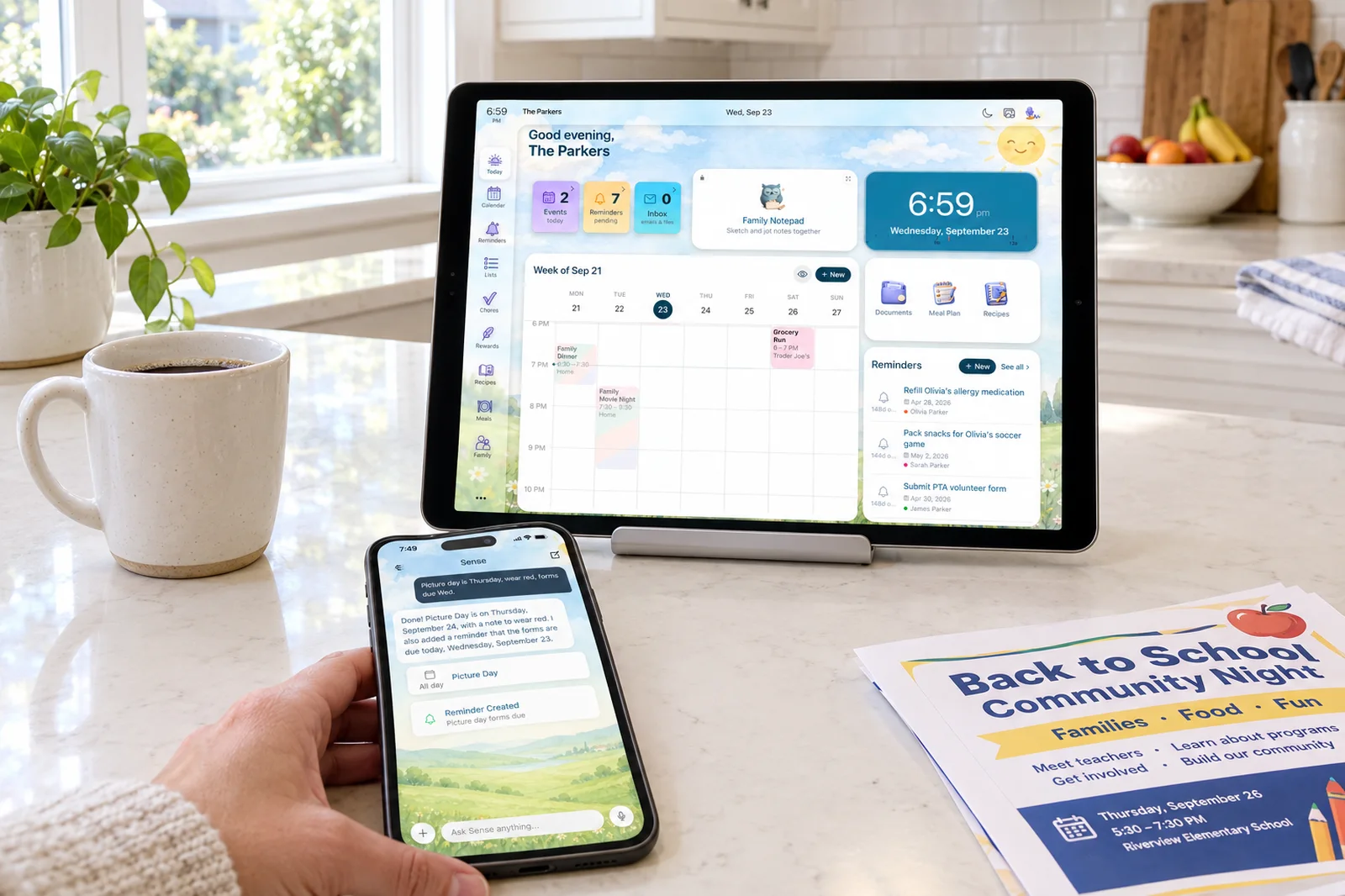
- Both are AI-first. Ohai is an assistant named O that you text, forward emails to, and send photos and PDFs. Sense does the same capture into a shared family organizer with chores, meals, Kid Mode, and a tablet display.
- Pricing is the biggest split. Ohai charges per person: $9.99 a month for one, $19.99 for two, $29.99 for a group, monthly only. Sense Premium is $6.99 a month or $59.99 a year for the whole family.
- Choose Ohai if you want an assistant that lives in your text messages, finds your school district's calendar by ZIP code, and can book a doctor's appointment for you.
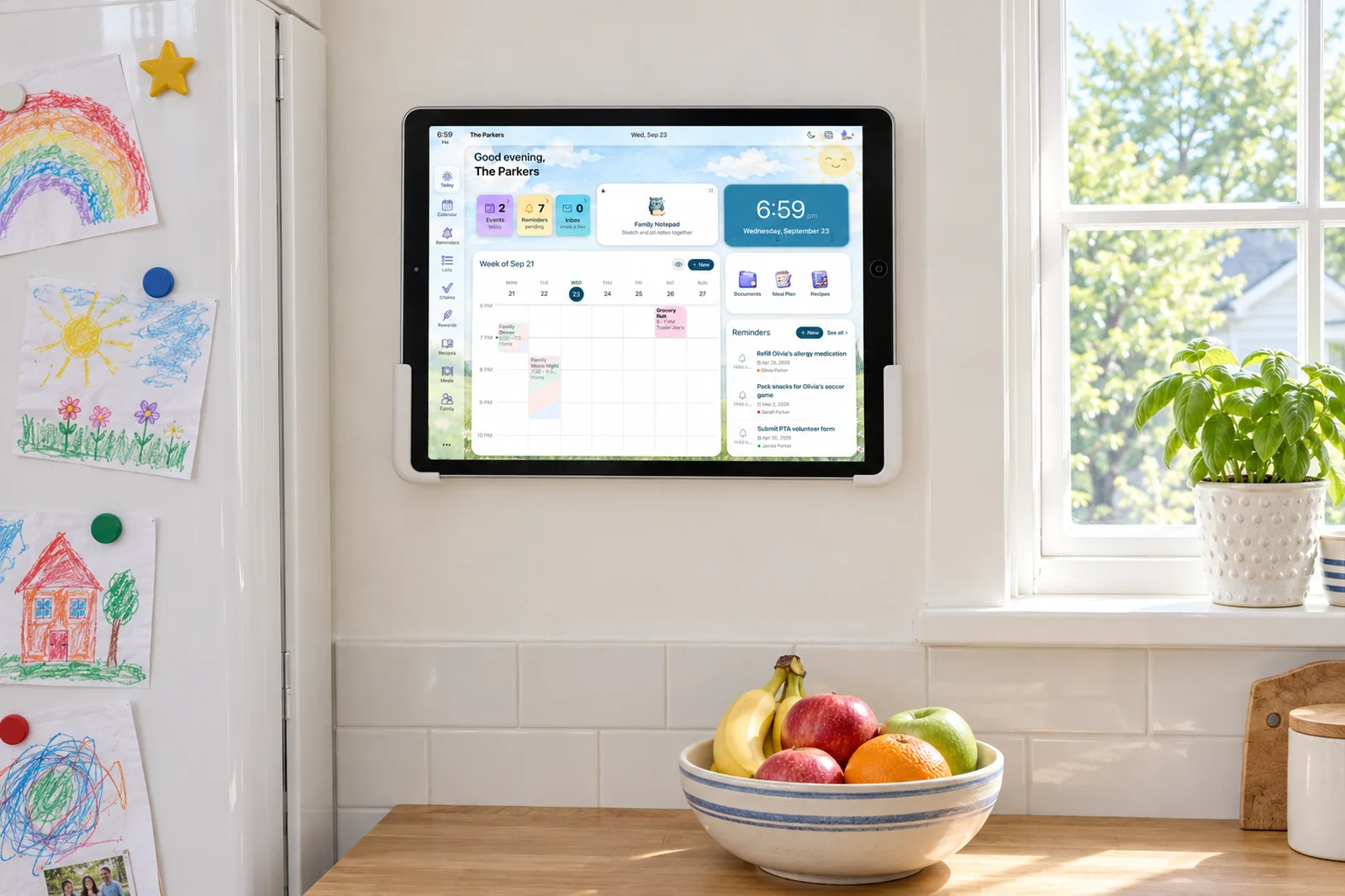
- Choose Sense if you want one organizer the whole household sees, with chores and allowance for the kids, a kid screen, and an old tablet in the kitchen showing today.
We make Sense, so this is not a neutral review. What we can do is be specific about where Ohai is ahead, where Sense is ahead, and what each one costs a real family over time. Ohai has been shipping since early 2024, has a founder who built Care.com, and does several things well. If you are also weighing Skylight or Nori, those are calendar-first products built around a display, and this post keeps to the two AI-first assistants.
The short answer: Ohai is a text-message assistant for the parent who runs the schedule, priced per person. Sense is a shared family organizer with the same capture tricks plus chores, routines, Kid Mode, and a tablet Hub, priced per household.
Sense vs Ohai at a Glance
| Comparison | Ohai | Sense |
|---|---|---|
| Starting point | Free version with reminders, meal planning, and lists. Shared household calendar and family task coordination need Premium. Free trial for new users; length not published. | Free forever on iPhone, Android, and web, no card. Full-access Premium trial, no card. |
| Core tools | Calendar with conflict detection, reminders, assignable to-dos, shared lists, meal planning with Instacart ordering, school calendar lookup, appointment booking by O. | Shared calendar, reminders, lists, chores, routines, rewards, allowance, meal plans, recipes, medications, documents, birthdays, and an AI chat assistant. |
| Capture and AI | Text O by SMS or in-app chat, voice and video notes, forward emails, upload screenshots, PDFs, and photos. Smart Ohai Sync pulls school announcements into the calendar. | Forward to share@getsense.ai with attachments, or send a WhatsApp message, photo, PDF, screenshot, flyer, URL, or voice note. Alexa and Siri. AI chat for schedule questions, homework, recipes, and bedtime stories. |
| Shared display | None listed. The shared surface is the app, the web dashboard, and text messages. | Sense Hub turns any old iPad, Android, or Fire tablet into an always-on family display that dims at night. |
| Calendar sync | Google, Outlook, and Apple Calendar. Direction not stated. 60,000 school calendars by ZIP code, checked daily. | Google Calendar sync. Apple iCloud, Outlook, school and sports iCal feeds by subscription. ICS export of the Sense calendar. |
| Kids and chores | To-dos and recurring reminders can be assigned to household members and delivered by text. No allowance, rewards, routines, or kid screen listed. | Chores, routines, rewards, and allowance. Kid Mode gives each kid a dedicated screen with no kid logins. |
| Regular pricing | Individual Premium $9.99 a month, Premium Plus (Duo) $19.99, Premium Group $29.99. Monthly only on the website. App Store in-app prices show $14.99, $24.99, and $39.99. | Free forever with 10 AI actions a month. Premium $6.99 a month or $59.99 a year, unlimited family members and AI actions. |
| Best fit | A parent who wants an assistant in their text thread that syncs the calendars they already use and takes small tasks off their plate. | A household that wants one organizer everyone sees, with kids' chores, a kid screen, and a kitchen tablet, fed from any source. |
Prices and features checked on September 24, 2026. Promotions change.
One Plan for the Whole Family
Forward a school email or snap a flyer, and the dates land on a calendar every family member sees, with no per-person fee.
Try Sense Online or get the app:

Where Ohai Wins
Ohai has real advantages, and some of them are things Sense does not do.
- It lives in your text messages. You can run Ohai from SMS without opening the app. Reminders and assigned tasks go out as texts, and Ohai says members get them "even if they don't use the app." For a partner or grandparent who refuses to install anything, that is a real advantage. Sense captures from WhatsApp and the share sheet, but the family looks at the app, the web, or the Hub.
- School calendars by ZIP code. Enter your ZIP, pick your district, and Ohai pulls that school's official calendar from a database of 60,000 and checks it daily for changes. Sense subscribes to any school iCal feed you give it, but it does not maintain a directory you can search.
- The assistant does tasks, not just captures them. "Assign to O" hands recurring to-dos to the assistant, and Ohai's August 2026 update has O booking doctor's appointments. Sense's AI creates events, lists, and plans; it does not make calls or bookings on your behalf.
- Grocery list to Instacart. Ohai's meal plan ends with a list you can send to Instacart. Sense builds the meal plan and the shopping list, and you take it from there.
- Calendar conflict detection. Ohai looks across your connected calendars, flags overlaps, and suggests alternative times.
Where Sense Wins
- One price for everyone. Sense Premium covers unlimited family members for $6.99 a month or $59.99 a year. Ohai charges $9.99 for one person, $19.99 for two, and $29.99 for a group, and its website lists no annual plan.
- Chores, routines, rewards, and allowance. Ohai can assign a to-do and remind by text. Sense runs kids' chores as routines with rewards and an allowance the kids can watch grow.
- A screen for each kid. Kid Mode gives every child their own view of chores, schedule, and rewards on a shared device, with no login and no phone number. Ohai's household members join a Circle and get their reminders by SMS or app alert, which means a phone.
- A tablet in the kitchen. Sense Hub turns an old iPad, Android, or Fire tablet into an always-on family display with today's schedule, meals, chores, photos, reminders, and birthdays. Ohai has no display mode.
- A full calendar you can see. Sense has day, week, and month views on every plan. Several App Store reviews of Ohai ask for a full calendar view, and one reviewer said events they had confirmed did not always appear.
- A wider net for capture. Both accept email, photos, PDFs, and screenshots. Sense also takes WhatsApp messages, URLs, voice notes, Alexa, Siri, and iOS share sheet, with unlimited AI actions on Premium.
- A clear retention rule. Sense deletes forwarded emails after 90 days and keeps only the extracted events. Ohai's policy publishes no retention period and allows human review of a subset of emails to improve the model.
Text Assistant or Shared Organizer
The deepest difference is who the product is for. Ohai is built around one parent's conversation with O. You text it, it texts you back, and the household benefits because that parent stays on top of things. The GBRLIFE review from July 2026 put it plainly: if you are the only one using it, "the mental load doesn't get lifted. It gets a nicer dashboard."
Sense starts from the other end. The calendar, lists, chores, and meals are shared objects the whole household sees, on phones, on the web, or on the Hub. Capture is the way things get in, not the product itself. A kid can check chores on the kitchen tablet without ever texting an AI, and a partner sees the field trip because it is on the calendar in front of them.
Ohai's answer to adoption is text reminders to people who never install the app. That works well for a co-parent who lives in iMessage. It works less well for a nine-year-old, and it does not create a place where the family looks together.
Capture and Calendar Sync
On capture the two are closer than the marketing suggests. Both read forwarded emails, PDFs, screenshots, and photos of flyers. Both take voice. Ohai's Smart Ohai Sync, launched in May 2026, connects to school announcements and updates the calendar when a date changes. Sense does the same job through email forwarding and iCal subscriptions to school and sports feeds, and it accepts WhatsApp messages and URLs that Ohai does not list.
On calendar sync Ohai lists Google, Outlook, and Apple Calendar as connected accounts. The site does not say whether the sync is two-way, and Google Play reviews from January 2026 report the Google connection failing on Android. Sense syncs Google Calendar and subscribes to Apple iCloud, Outlook, and any iCal feed, and it publishes its own calendar as an ICS feed so the reverse direction works with anything.
One note on Ohai's Android app: as of our check it shows 1,000-plus downloads and a 3.0 rating from 9 reviews, with two reviewers unable to sign in or connect Google. The iPhone app is the mature one, at 4.4 from 220 ratings.
The Full Cost Over Three Years
Ohai prices by seat and bills monthly. A two-parent household needs Premium Plus (Duo) at $19.99 a month, which is $239.88 a year and $719.64 over three years. Add a grandparent or a nanny and you are on Premium Group at $29.99 a month, or $1,079.64 over three years. Ohai's website lists no annual price, and its App Store listing shows in-app purchase prices of $14.99, $24.99, and $39.99, so check which you are being charged before you subscribe.
Sense Premium on the annual plan is $59.99 a year for unlimited family members, or $179.97 over three years. Paid monthly it is $6.99 times 36, or $251.64. Both products have a free tier, so a light user of either can pay $0.
| Period | Ohai Premium Plus (Duo) | Sense Premium (annual) |
|---|---|---|
| Year 1 | $239.88 | $59.99 |
| Years 2-3 | $479.76 | $119.98 |
| 3-year total | $719.64 | $179.97 |
The gap is a pricing model, not a verdict. Ohai charges for each adult who talks to O. Sense charges once for a household, because the point is that everyone in it looks at the same thing.
How to Choose
Pick Ohai if:
- You want to run your schedule from a text thread and rarely open an app.
- Your school district is in Ohai's directory and you want its calendar kept current without hunting for a feed.
- You want the assistant to take on tasks, including booking appointments.
- Your household is one or two adults and the per-person price is fine.
Pick Sense if:
- You want the whole household, kids included, looking at one shared calendar, list, and chore board.
- You want chores with rewards and allowance, and a Kid Mode screen with no kid logins.
- You have an old tablet that could become a kitchen display.
- You want one flat price for the family, with an annual option.
Sense vs Ohai: The Bottom Line
Ohai is a good AI assistant for a parent who wants to text their way through the week. The school calendar directory, text-delivered reminders, conflict detection, and Instacart hand-off are real, and O taking on bookings is something Sense does not attempt. If that parent is you and you are happy paying per seat, Ohai will earn its keep.
Sense is the pick when the goal is a shared family organizer rather than a personal assistant. It captures from the same sources and more, then puts the result where the whole household can see it: phones, the web, a kid's own screen, and an always-on tablet. It adds chores, routines, rewards, and allowance that Ohai does not have, and it costs one household $59.99 a year instead of $239.88 or more.
Frequently Asked Questions
Is Ohai free?
Ohai has a free version with reminders, meal planning, and lists. The shared household calendar and family task coordination require Premium, which is $9.99 a month for one person, $19.99 for two, or $29.99 for a group. Sense's free tier includes the shared calendar, reminders, lists, and 10 AI actions a month with no time limit.
Does Ohai have a tablet display mode like Sense Hub?
No. As of our check, Ohai lists no display, wall, or tablet mode on its site or store listings. Its shared surface is the app, the web dashboard, and text messages. Sense Hub runs on any old iPad, Android, or Fire tablet and is included in Premium.
Can kids use Ohai or Sense without their own phone?
Ohai's household members are invited into a Circle and receive reminders by SMS or app alert, so each member needs a phone number. Sense's Kid Mode gives each child a dedicated screen on a shared device or the Hub, with no login, no phone, and no account.
Which syncs with more calendars, Ohai or Sense?
Ohai connects Google, Outlook, and Apple Calendar and adds a school calendar directory searchable by ZIP code. Sense syncs Google Calendar, subscribes to Apple iCloud, Outlook, and any school or sports iCal feed, and exports its own calendar as an ICS feed. Ohai's sync direction is not stated on its site.
Try Sense Free
Forward your first school email or snap a flyer. The dates land on a shared calendar, and the kids get their own screen.
Try Sense Online or get the app:
Related reading: Best AI family organizer apps 2026 · Sense vs Ollie (2026) · Sense vs Nori (2026)