Quick Summary
- Ollie is an AI assistant you text over iMessage or SMS. No app to open. It reads a connected Gmail or Outlook inbox, watches your calendar, briefs you each morning, plans dinners, and orders groceries. Pricing is per reply: free for 50 replies a month, then $25 or $100 a month.
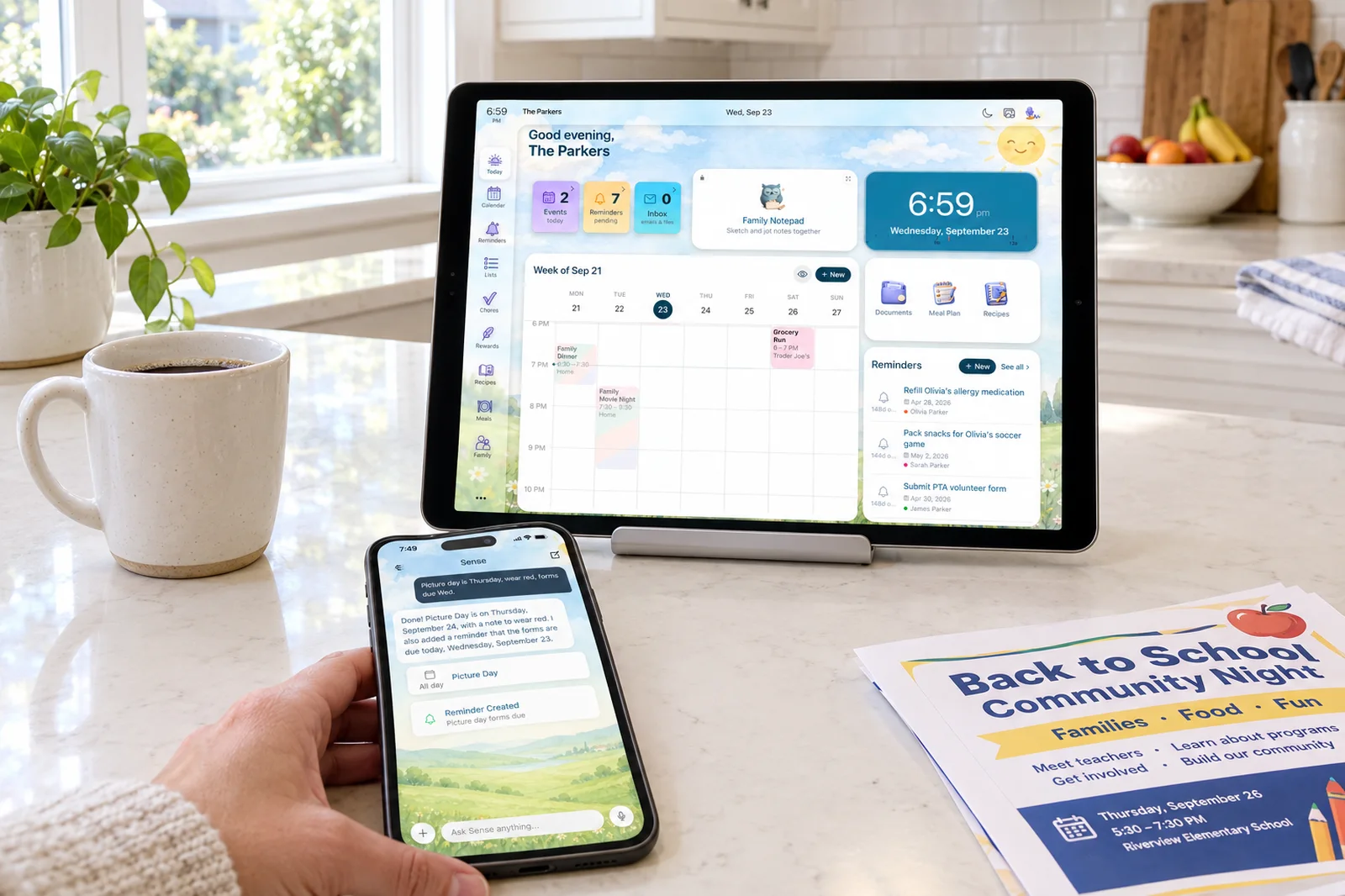
- Sense is an AI family organizer for iPhone, Android, and web. You forward emails, WhatsApp messages, photos, and PDFs, and the dates land on a shared calendar next to chores, meal plans, lists, and a tablet display. Free forever, or $6.99 a month for the whole family.
- Choose Ollie if you want a proactive assistant in your text thread that reads your inbox and handles errands like bookings and bill pay, and a monthly reply budget suits you.
- Choose Sense if you want one shared place the whole household looks at, kids included, with chores, allowance, routines, meal planning, and a kitchen tablet, at a flat family price.
Cross-shopping the text-message assistants? See Sense vs Ohai.
We make Sense, so this is not a neutral review. We have tried to be fair anyway, because Ollie is a serious product with a clear point of view, and the two solve family logistics from different ends. Where Ollie does something better than we do, we say so.
The short answer: Ollie is an assistant that lives in your texts and works on your behalf, while Sense is a shared organizer the whole family sees, fed by AI capture. If your family wants a single source of truth on a screen, pick Sense. If you personally want a helper that reads your inbox and texts you what matters, Ollie is the more direct fit.
Sense vs Ollie at a Glance
| Comparison | Ollie | Sense |
|---|---|---|
| Starting point | Text a phone number. No app, account, or card. Free for 50 Ollie replies a month. | Free app on iPhone, Android, and web. No card. Free tier never expires. |
| Core tools | Inbox triage, calendar watching, reminders, daily briefings, meal planning with grocery ordering, and errands (bookings, orders, bill pay) by text. | Shared calendar, reminders, lists, chores, routines, rewards, allowance, meal plans, recipes, medications, documents, birthdays, and an AI chat assistant. |
| Capture and AI | Text it, or grant OAuth access so it reads your Gmail or Outlook inbox. A photo of a flyer becomes an event. Voice capture is not listed. | Forward an email, WhatsApp message, photo, PDF, screenshot, flyer, URL, or voice note, or use Alexa or Siri. AI chat for schedule questions, homework, and recipes. |
| Shared display | None. The family group text is the shared surface. | Sense Hub turns any old iPad, Android, or Fire tablet into an always-on family display. |
| Calendar sync | Google and Outlook via OAuth; creates events in the calendar you already use. Apple Calendar appears on its landing page but not in its FAQ. | Google Calendar sync. Apple iCloud, Outlook, school and sports iCal feeds by subscription. ICS export. |
| Kids and chores | Kids can join the group chat. No chores, allowance, routines, or kid screen listed. | Chores, routines, rewards, and allowance. Kid Mode gives each kid a dedicated screen, no kid logins. |
| Regular pricing | Free (50 replies a month plus 6 a day). Everyday $25 a month (150 plus 10 a day). Always-On $100 a month (1,000 plus 15 a day). Monthly only. Extra replies $0.25 to $0.30 each. | Free forever with 10 AI actions a month. Premium $6.99 a month or $59.99 a year, unlimited family members and AI actions. |
| Best fit | A parent who lives in iMessage and wants an assistant that reads the inbox, briefs them, and runs errands. | A household that wants one shared organizer everyone sees, with kids' chores and a kitchen tablet, fed from any source. |
Prices and features checked on September 24, 2026. Promotions change.
See Your Family's Week on One Screen
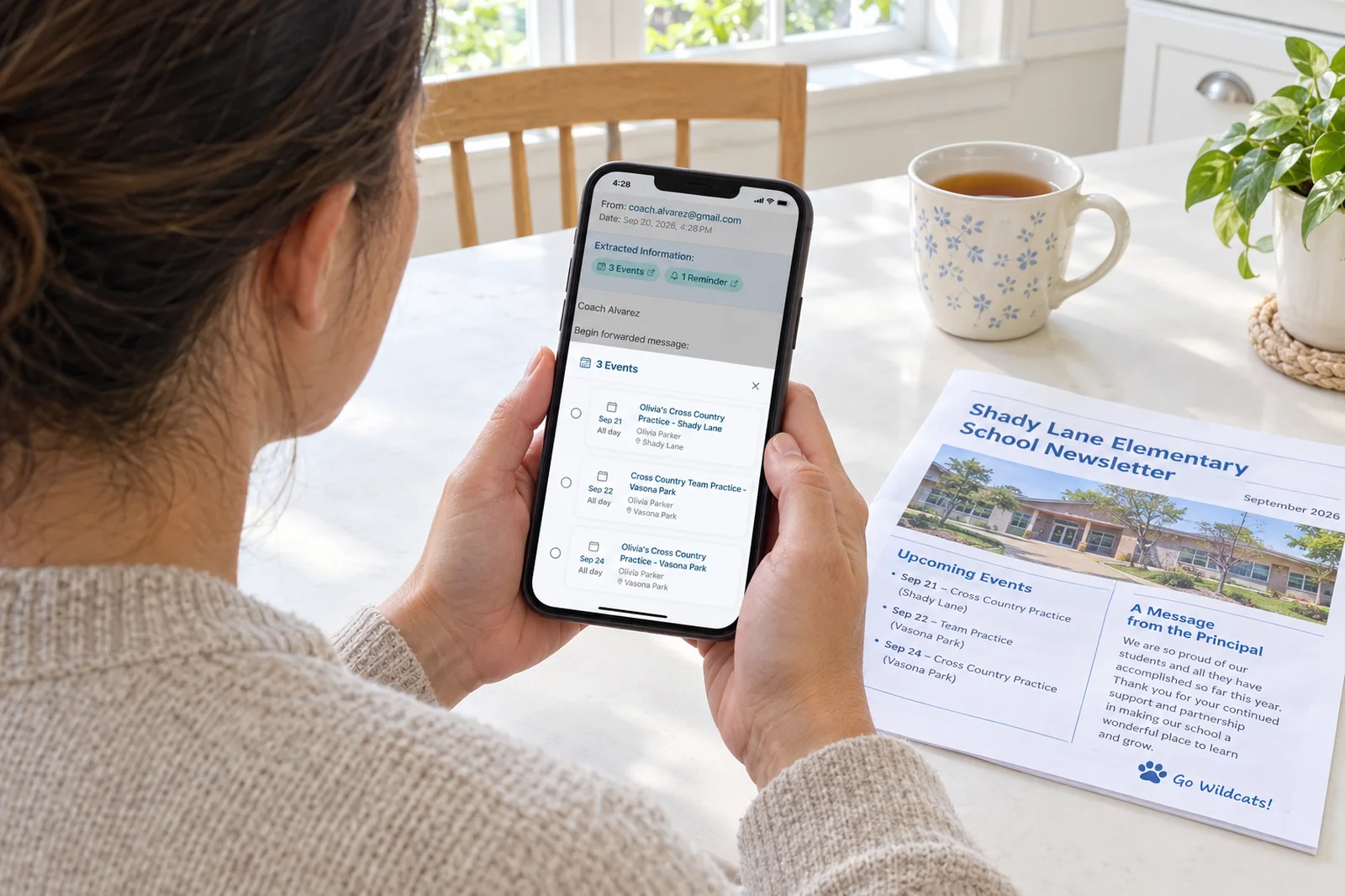
Forward a school email to Sense and the dates appear on a calendar the whole family can see, no texting back and forth.
Try Sense Online or get the app:

Where Ollie Wins
Ollie began in late 2024 as a meal planning app and grew into a general family assistant, and in September 2026 it raised a $7.5 million seed round led by Khosla Ventures. Several things it does better than we do:
- It meets you where you already are. You text a number from iMessage or SMS and you are using it. No download, no account. Adding a partner or a grandparent means adding them to the group text. That is the lowest onboarding cost we have seen.
- It reads the inbox without being asked. Connect Gmail or Outlook and Ollie watches for school emails, alerts you about specific senders, and sends an evening digest and a morning briefing with weather and the day's schedule. Sense only sees the emails you forward, so Ollie's model is the more proactive one.
- It runs errands. Ollie promises forms, bookings, orders, and bill pay from a text, plus subscription cancellations. For sensitive steps it opens a cloud browser session and sends you a link rather than asking for passwords. Sense does not book appointments or pay bills for you.
- Meal planning is deep and connected to delivery. Ollie suggests dinners by text, lets you swipe preferences, builds a grocery list grouped by aisle, and places the order through Amazon, Instacart, or Walmart. A photo of your fridge turns into dinner ideas. The separate Ollie for Meals app holds a 4.8 rating from 938 App Store reviews. Sense plans meals and keeps recipes but does not place grocery orders.
- Its privacy position is explicit. Ollie states SOC 2 Type 1 compliance, no ads, and no use of your data to train models. Sense deletes forwarded emails after 90 days and keeps only the extracted events, but Ollie's documented compliance program is a point in its favor.
Where Sense Wins
- Everyone sees the same thing. A text thread scrolls away. Sense keeps the calendar, the shopping list, and the chore board as screens the whole family opens on phones, the web, and the kitchen tablet. Nobody has to ask what is happening Thursday because Thursday is right there.
- More ways in. Sense takes a forwarded email with attachments, a WhatsApp message, a photo, a PDF, a screenshot, a URL, typed text, a voice note, an Alexa request, or a Siri shortcut from an iPhone, Apple Watch, HomePod, or CarPlay. Ollie takes text and photos and reads a connected inbox. As of our check it does not list voice, WhatsApp, PDF, or screenshot capture.
- Kids are part of the system. Sense has chores, routines, rewards, and allowance, and Kid Mode gives each child a dedicated screen without a login. Ollie lets kids join the group chat but has no chore, allowance, or routine features that we could find.
- A display mode. Sense Hub turns any old iPad, Android, or Fire tablet into an always-on display of today's schedule, meals, chores, photos, reminders, and birthdays, and dims itself at night. Ollie has nothing comparable, and its own positioning contrasts it with wall calendars on purpose.
- Flat pricing. Sense Premium is $6.99 a month or $59.99 a year for unlimited family members and unlimited AI actions. Ollie meters every reply, and its paid tiers are $25 and $100 a month with no annual option.
- Every calendar in one place. Beyond Google sync, Sense subscribes to Apple iCloud, Outlook, and school and sports iCal feeds, and exports its own calendar as an ICS feed. Ollie's FAQ names Google and Outlook only.
Reading Your Inbox vs Forwarding It
Both products exist because school and activity emails bury the dates that matter. They get at them differently.
Ollie asks for OAuth access to your Gmail or Outlook account and reads the mailbox itself. The upside is that it catches things you never thought to forward and can summarize the whole inbox at the end of the day. The cost is standing access to one person's inbox, with the output arriving as a text you then act on. A June 2026 privacy writeup on Ollie noted its policy allows message content to be reviewed in aggregate to improve its systems. Ollie's answer is its SOC 2 report and no-training pledge.
Sense works on what you send it. You forward the newsletter to share@getsense.ai, share a WhatsApp message, or snap the flyer on the fridge, and the AI extracts every date, time, and location onto the shared calendar. That is a deliberate step, so an email you never forward will slip past. In return, Sense never has standing access to your mailbox, and forwarded emails are deleted after 90 days.
If you want the assistant to be the one reading, Ollie. If you want to decide what the assistant sees, Sense.
Kids, Chores, and the Kitchen Tablet
This is where the two products stop overlapping. Ollie is built around the parent who carries the mental load and keeps that parent informed through their phone. Kids can be in the group chat, and Ollie's testimonials mention it doing the reminding so a parent does not have to nag. But there is no chore list, no allowance ledger, no routine a kid can tick through, and no screen that belongs to a child.
Sense treats the household as the unit. Chores and routines are assigned to specific kids, completing them earns rewards or allowance, and Kid Mode gives each child their own view on a shared device. The Hub tablet in the kitchen shows the same schedule, chores, and meals everyone sees on their phones. If the problem is "the kids never know what is going on," a text assistant to one parent does not fix it. A shared display and per-kid screens do.
If your kids are grown or chore tracking is not your thing, Ollie's simpler scope may suit you better.
The Full Cost Over Three Years
Ollie's pricing needs a plain explanation first. A message is one reply from Ollie; your own texts do not count. Free includes 50 replies a month plus 6 a day, which reset each morning and do not roll over. Everyday at $25 a month gives 150 plus 10 a day. Always-On at $100 a month gives 1,000 plus 15 a day. One subscription covers the family group chat, so every reply to your partner or teenager draws from the same pool. Extra replies cost $0.30 each on Everyday or $0.25 on Always-On.
Both products have a free tier that never expires, so a light user of either pays $0. For a family on the paid tier: Ollie Everyday is $25 a month with no annual plan, so $300 a year and $900 over three years before top-ups. Always-On is $3,600 over three years. Sense Premium on the annual plan is $59.99 a year, or $179.97 over three years. Paid monthly, Sense is $6.99 times 36 months, or $251.64.
| Period | Ollie Everyday | Sense Premium (annual) |
|---|---|---|
| Year 1 | $300 | $59.99 |
| Years 2-3 | $600 | $119.98 |
| 3-year total | $900 | $179.97 |
The gap reflects different products. Ollie sells a service that reads your inbox and runs errands, and its per-reply pricing follows its costs. Sense sells a shared organizer with unlimited AI capture on a flat plan.
How to Choose
Pick Ollie if:
- You want an assistant in your text thread, not another app on the home screen.
- You want it to read your Gmail or Outlook inbox and tell you what matters, without forwarding anything.
- Errands matter: bookings, orders, bill pay, and cancellations done by text.
- Meal planning with grocery delivery is a top priority.
- Your kids are older or not part of the system you are building.
Pick Sense if:
- You want one shared calendar, list, and chore board the whole family looks at.
- You want to capture from email, WhatsApp, photos, PDFs, screenshots, voice, Alexa, and Siri.
- Chores, routines, rewards, allowance, and a Kid Mode screen are part of the plan.
- You want an always-on tablet display in the kitchen.
- You want a flat family price with no per-message meter.
Sense vs Ollie: The Bottom Line
Ollie is the better personal assistant. It arrives with zero friction, reads the inbox for you, briefs you every morning, and does things on your behalf that Sense does not attempt, like booking an appointment or paying a bill. Its meal planning is deeper than ours and connects straight to grocery delivery. If you are the parent carrying the load and want something that quietly texts you what to do next, Ollie is a strong choice, and its free tier lets you find out in an afternoon.
Sense is the better family organizer. It points the same AI capture idea at a shared surface: a calendar everyone sees, chores the kids own, meals on the kitchen tablet, and a screen for each child. It accepts more inputs, syncs more calendars, and costs a flat $59.99 a year for the household instead of $300 or more. If the goal is a household that runs itself rather than a parent who is better informed, that is what we built.
Frequently Asked Questions
Is Ollie an app or a text service?
Ollie's family assistant works entirely over iMessage or SMS on iOS and Android. There is no app to download and no account to create to get started. A separate Ollie for Meals app exists on the App Store and Google Play for meal planning. Sense is an app for iPhone, Android, and web.
Does Ollie sync with Google Calendar like Sense does?
Yes. Ollie connects to Google or Outlook calendar through OAuth and can view your schedule and create events. Sense syncs with Google Calendar and also subscribes to Apple iCloud, Outlook, and school and sports iCal feeds, and exports its own calendar as an ICS feed.
Can my kids use Ollie or Sense?
Ollie lets you add family members to a group conversation, so a kid with a phone can see and send messages. It does not list chores, allowance, or a kid-specific mode. Sense has chores, routines, rewards, and allowance, plus Kid Mode, which gives each child a dedicated screen on a shared device without a login.
Which is cheaper for a family, Ollie or Sense?
Both have a free tier. Ollie's paid plans are $25 or $100 a month, billed monthly, with a cap on replies and paid top-ups beyond it. Sense Premium is $6.99 a month or $59.99 a year for unlimited family members and unlimited AI actions. Over three years that is $900 for Ollie Everyday against $179.97 for Sense on the annual plan.
Try Sense Free, No Card Needed
Free forever for the basics, and a full-access Premium trial when you want email, WhatsApp, and photo capture, chores, meals, and the Hub.
Try Sense Online or get the app: