Quick Summary
- Best overall: Sense - the only chore app that bundles tasks into named routines (Bedtime, After-School) with shared schedule, assignee, and progress.
- Best gamification: S'moresUp - rich points, badges, and smart-home triggers if you want maximum reward machinery.
- Best for younger kids and ADHD: Joon - virtual pet wrapper that genuinely keeps a 6-year-old opening the app.
- Best with a real debit card: BusyKid - chores convert into spend, save, share, invest. $3.99/mo for up to five kids.
Most "best chore app" lists pretend every option is roughly equivalent. They aren't. The actual differences are about who the app is built for and what shape it gives to "the work of running a household."
We tested seven apps the way families actually use them - the morning rush, the after-school 90 minutes, bedtime, and the weekend reset. We graded on what mattered: do kids actually open it, does the parent setup pay off, and can you tell at a glance whether bedtime is done.
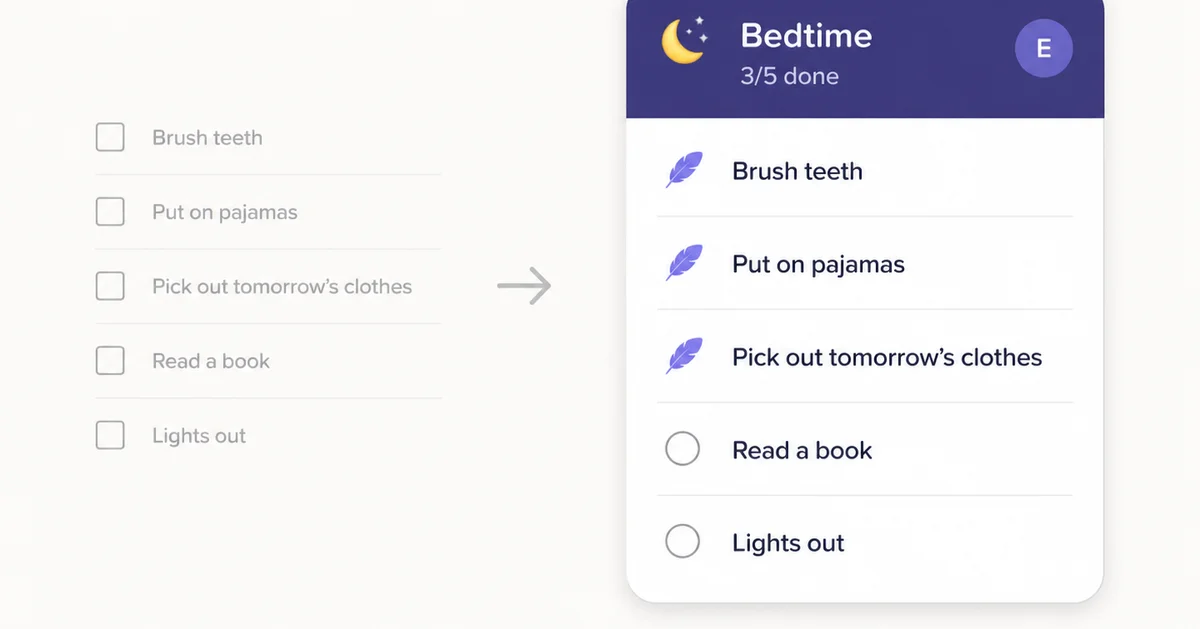
One pattern jumped out. Almost every chore app on the market treats each chore as an isolated row in a list. Brush teeth, pajamas, pick out clothes, read a book are four rows, not one bedtime. That model creates real friction every time you push bedtime back, swap who is on duty, or want a clean answer to "did the kids do bedtime?" One app in this list breaks that pattern.
Quick Comparison
| App | Price | Best For | Real Money? |
|---|---|---|---|
| Sense | Free / $6.99/mo | Routines, not flat lists | No - points to anything |
| S'moresUp | Free / $7.99/mo | Heavy gamification | No - in-app rewards |
| Joon | Free (7/day) / $12.99/mo | Younger kids, ADHD | No - virtual pet |
| Skylight Chores | $380 + $79/yr | Already own hardware | No - star rewards |
| BusyKid | $3.99/mo | Real allowance + debit card | Yes - bank transfers |
| Greenlight | $5.99/mo+ | Debit card with chores | Yes - bank transfers |
| Cozi | Free (limited) / $39/yr | Calendar + basic to-dos | No - no rewards |
See What Chores Look Like as Routines
Forward a school email, and Sense pulls events onto the calendar automatically. Set up morning and bedtime as routines once, and the kids run them. Try Sense free.
Try Sense online

The 7 Best Family Chore Apps
1. Sense - Best Overall Family Chore App
Full disclosure: this is our app. But here is the actual reason it leads this list: Sense is the only chore app that treats routines as first-class containers instead of a flat task list.
"Bedtime" is not a chore in Sense. It is a named container, with its own emoji and color, that owns a schedule, an assignee, and a celebration. Brush teeth, pajamas, pick out clothes, read a book live inside it. Push bedtime to 8:30 and every chore inside it follows. Swap bedtime to the other parent and the whole bundle reassigns at once. Walk past the kitchen tablet and you can see "2/5 done" on the bedtime card without unlocking anything. We wrote up the full reasoning behind the redesign here.
The chore system uses points that convert to allowance via "feathers" - not stars, coins, XP, or unlockable avatars. Other family apps have been mining the same gamified vein for a decade. We wanted something quieter that still feels like a real reward.
And because Sense is a full family organizer, not a single-purpose chore app, the same screen that runs your bedtime routine also reads your school emails, suggests meals, manages shopping lists, and answers questions like "do we have anything Thursday?"
"Treating bedtime as one thing instead of five was the unlock. Our 7-year-old actually finishes the bundle now because the cards feel like progress, not a checklist of nags." - Daniel R., parent of 2
Strengths
- Routines as containers, not flat lists
- Kitchen-tablet hub view, kids-first columns
- Points convert to whatever reward you choose
- Chores live inside a full family organizer
- Organize on iOS, Android, or web
- Free tier is genuinely usable
Limitations
- No real-money debit card (use BusyKid for that)
- No smart-appliance integration
- Newer app (launched 2025)
Set Up One Routine Tonight. See It Run Tomorrow.
Build a bedtime routine in three minutes, mount the tablet, and watch the kids run it themselves. Full access free to start - no credit card required.
Try Sense online
2. S'moresUp - Best for Heavy Gamification
S'moresUp is the maximalist option. Points called S'mores, badges, family communications threads ("Campfire"), parental approvals, screen-time controls, even smart-appliance triggers - the Bosch dishwasher can literally assign the "empty me" chore to whoever is on rotation.
If your kids are motivated by the full Fortnite-style reward loop, this is the strongest implementation of it. The 45-day premium trial is generous enough to find out whether the novelty wears off or sticks. Some families it sticks for; others find it overwhelming within a week.
The tradeoff is setup overhead. There are a lot of dials, and the interface puts a lot of them on the parent's plate. If you would rather spend that energy designing your bedtime routine than tuning point conversion ratios, look elsewhere.
Strengths
- Best-in-class points and badges machinery
- Smart-home integrations (Bosch, GE)
- Generous 45-day premium trial
- Active developer support
Limitations
- Heavy setup overhead
- Gamification can lose its grip after a month
- Calendar and lists are not the core focus
- UI density can overwhelm
3. Joon - Best for Younger Kids and ADHD
Joon's premise is unusual: every chore is a "quest" your kid completes to feed and care for a virtual pet. The pet grows, evolves, and unlocks new outfits. It is built for the kid who closes any app that feels like school within four seconds.
It works. For ages roughly 6 to 11, especially kids with ADHD or autism, the pet wrapper genuinely lowers the activation energy to start a chore. The developer publishes clinician input and the app gets specifically recommended by ADHD parent communities.
Two real catches. First, the free tier caps you at 7 verified quests per day, which is not enough for most families with multiple kids. You will hit the paywall fast. Second, the wrapper that works so well at 7 stops working at 12, and the price ($12.99/mo or $89.99/yr) is the highest in this list. It is a phase-specific tool.
Strengths
- Virtual pet wrapper genuinely engages young kids
- Clinician-informed, ADHD-friendly design
- Lowest activation energy of any app tested
Limitations
- Most expensive option in this list
- Free tier capped at 7 quests/day
- Outgrown by tweens
- No calendar, lists, or family schedule
If transitions are the hard part (mornings, bedtime, after-school), try Sense free - set up one routine tonight.
4. Skylight Calendar Chores - Best If You Already Own One
Skylight is a wall-mounted touchscreen calendar that includes a chores feature. Kids see their chores on the always-on display, tap to mark complete, and earn stars that unlock rewards the parent defines. For non-readers, chores can be set up with pictures so a 4-year-old can run them.
The kitchen-display angle is real. An always-visible chore board on the wall does change family behavior in ways a phone-only app does not. But the entry cost is hard to justify in 2026: $380 for the device, plus the chore rewards system specifically lives behind the $79/year Plus tier. The two together are well over $400 in year one before you have set up a single chore.
If you already bought a Skylight 2 or have a Skylight Plus subscription, the chore feature is a nice add-on. If not, the same kitchen-display experience is available on any spare iPad or Android tablet you already own. We covered the full Skylight 2 trade-off here and the BYOD alternative here.
Strengths
- Always-on wall display genuinely shifts behavior
- Picture-based chores for non-readers
- Star reward system with parent-defined prizes
Limitations
- $380 hardware + $79/year for chore features
- Locked to one location (mounted device)
- No use on parents' phones beyond a companion app
- Chores model is a flat list, not routines
5. BusyKid - Best for Real Allowance and a Debit Card
BusyKid is the cleanest expression of "chores convert to real money." Parents assign chores with dollar values, kids complete them through the week, and on payday the earnings split automatically into spend, save, share, and invest buckets. Each kid gets a real prepaid debit card, parental controls included.
It is the cheapest financial-literacy option in this list ($3.99/mo covers five kids), and the spend-save-share-invest split does the actual teaching work that vague promises about "allowance lessons" do not. If your goal is "my 10-year-old understands money," this is the right shape.
The catch: BusyKid is single-purpose. It is not a family organizer, has no calendar, no lists, no meal planning. And it really is built around the dollar-value model - the chore experience without the money attached is thin. If chores-as-money is not the vector you want, pick something else.
Strengths
- Real prepaid debit card per kid
- Automatic spend / save / share / invest split
- Cheapest in this list at $3.99/mo for 5 kids
- Genuine financial-literacy curriculum
Limitations
- US-only banking
- Single-purpose: no calendar, lists, or meals
- The whole experience is built around the money
- Setup involves a real funding source
6. Greenlight - Best Debit Card With Chores Bolted On
Greenlight starts from the other end of the BusyKid trade-off. It is primarily a kids' debit card and investing account that happens to include a chore tracker. The financial side is more polished than BusyKid - investing, savings goals, parent-paid interest, parental monitoring - which is why parents who priced both for the long term often end up here.
The chore tracker itself is the basic version: list, assign, mark complete, payout. There is no routine model, no gamification, no leaderboard. It works fine for older kids whose motivation is the money, but it will not engage a reluctant 7-year-old the way Joon or S'moresUp will.
Price scales fast. Core is $5.99/mo, but the features most parents end up actually wanting (investing, identity monitoring) are in the higher tiers at nearly triple the price.
Strengths
- Strongest financial product in this list
- Investing accounts and savings goals
- Parent-paid interest and matching
- Identity monitoring on top tier
Limitations
- Chore tracker is barebones (no routines, no gamification)
- Real value lives in the higher-priced tiers
- Not built for younger or reluctant kids
- US-only
7. Cozi - Best If You Just Need a Shared To-Do List
Cozi is the default family-calendar-and-list app from 2008, and it still works exactly the way you remember. Shared color-coded calendar, recurring to-do items, grocery list, meal planner. Many families use Cozi's to-do list for chores by setting up recurring tasks per kid.
If "I just want a calendar with shared lists and don't care about points, gamification, or money" describes you, Cozi covers it. The 2024 free-tier limit (30 days of calendar history only) made the $39/year Gold tier essentially required for most families.
The chore experience is exactly that: shared recurring tasks. No motivation system. Reluctant kids will not get pulled in. It is the simple, reliable, unromantic choice.
Strengths
- Proven, reliable, and broadly familiar
- Calendar + lists + meal planner in one place
- Low setup overhead
Limitations
- No gamification, points, or rewards
- Free tier limited to 30 days of history
- Will not motivate a reluctant kid
- Interface feels dated
How to Pick
After running all seven through real family weeks, here is the actual decision tree:
What is the daily friction?
If the friction is transitions - morning chaos, after-school 90 minutes, bedtime resistance - a routine-based app like Sense beats a points-based one. Routines give kids and parents a named, visible scaffold for the moment. If the friction is motivation - kids will not start tasks at all - heavy gamification (S'moresUp, Joon) does more work.
Do you want chores tied to real money?
If yes, BusyKid is the cheapest dedicated choice and Greenlight is the better financial product if you want investing too. If no, Sense and S'moresUp both let points convert to whatever reward you decide - allowance, screen time, ice cream, a sleepover. Families differ strongly on whether chores should be transactional with cash; pick the model that matches your parenting view.
How old are your kids?
Joon dominates the 6-11 ADHD-friendly slot and ages out fast. BusyKid and Greenlight only make sense once kids are old enough to care about money (roughly 8+). Sense and S'moresUp scale from kindergarten through teens because the underlying model (routines or points) is age-agnostic.
One app or several?
If chores are the only piece of family life you want an app for, a dedicated chore app (S'moresUp, Joon, BusyKid) is fine. But the families we tested with kept asking us why they had a separate app for chores, calendar, meal planning, and lists. Sense and Cozi consolidate. Sense does more; Cozi is simpler.
Are transitions your real problem? (ADHD families especially)
Almost every parent we talked to said "mornings" or "bedtime" before they said "the chore list." If that matches your family, named routines are doing the work, not the points. We wrote separately about why auto-intake and external scaffolds matter more than gamification for ADHD families.
The Bottom Line
There is no universal best family chore app, because "chore app" turns out to describe at least four different products in a trench coat: a routine-runner, a motivation engine, a financial-literacy tool, and a shared to-do list.
If you have not figured out which problem is actually slowing your family down, the safest first move is to name the moment that hurts most this week - the morning, the after-school slump, bedtime, weekend chores - and pick the app whose shape matches that moment. Routines for transitions. Points for motivation. Real money for older kids learning financial responsibility. A shared list for simple coordination.
For most families we tested with, the transitions were the bottleneck, and that is why we built Sense's chores screen around routines instead of rows. If you want to try the routine model, start with one routine tonight - bedtime is usually the easiest - and see if the kids run it themselves by the weekend.
Frequently asked questions
What is the best family chore app in 2026?
We tested 7 apps and Sense ranks first because it is the only one built around routines rather than a flat task list. Bedtime, after-school, and morning become named containers that own their own schedule, assignee, and progress, so adding a fifth chore inside bedtime takes four taps instead of a full form. Sense also runs as an always-on tablet display so the whole family's chore progress is visible without unlocking a phone.
Which chore app is best for kids with ADHD?
Joon and Sense both work well for ADHD kids, for different reasons. Joon wraps each task in a virtual pet game, which keeps young kids engaged but caps the free tier at 7 quests per day. Sense uses named routines (Bedtime, After-School) as external scaffolds for transitions, which is where executive function taxes the most. A kitchen tablet running Sense in hub mode means nobody has to hold the sequence in their head.
Which chore app pays real money to kids?
BusyKid ($3.99/mo) and Greenlight ($5.99/mo) both connect chores to a real debit card and let kids spend, save, share, and invest. Greenlight is debit-card-first with chores bolted on. BusyKid is purpose-built around the chore-to-payout loop and is cheaper. If you want points that convert to whatever reward you decide (allowance, screen time, ice cream), Sense and S'moresUp both do that without involving a bank.
Do I need a Skylight Calendar to use the chores feature?
Yes. Skylight's chores feature is built into the wall-mounted hardware and requires the $79/year Plus subscription on top of the $380 device. If you want a kitchen-tablet display showing the family's chores at a glance without buying hardware, Sense runs the same hub-style layout on any spare iPad or Android tablet you already own.
3 Minutes to Build a Routine. The Kids Run It From There.
Set up bedtime, mount the tablet, watch what happens. That's it.
Try Sense online
Full access free to start. No credit card required.
Related reading: Why we rebuilt the chores screen around routines · ADHD-friendly family organization · OurHome alternatives · Skylight Calendar 2 review · Best family calendar apps 2026