

Quick Summary
- Best AI family assistant for the whole household: Sense. Ask it about the week, forward it emails, photos, PDFs, and WhatsApp messages, and it updates one calendar, list set, chore chart, and meal plan the family shares. Free, or $6.99/mo per household.
- Best assistant to text: Ohai. Text "O" a task and it handles reminders, lists, and calendar entries. Priced per person.
- Best with a wall screen you talk to: Nori. A family organizer with AI import, voice, and an optional dedicated display.
- Best inbox-connected briefing: Fambot. Connects to Gmail or Outlook and texts you tomorrow's plan each evening. Free in beta.
- Already use ChatGPT, Claude, or Gemini? Good for one-off questions, but they keep no shared family plan. More below.
"AI family assistant" now covers very different products. Some are a chat you text. Some are a family organizer with an assistant inside. Some read your inbox and send a summary. And plenty of parents just use ChatGPT.
We make Sense, so this is not a neutral review. We checked each competitor's features and prices on its own website or App Store listing, and say when a fact is older than this month.
We judged each one on three questions a parent would actually ask:
- Does it know my family? Can it answer "what time does swim end Saturday?" without being told the schedule first?
- Does it do the thing, or tell me to? When you say "move piano to Thursday", is it moved?
- Does anyone else see it? An assistant only one parent talks to leaves that parent as the family's calendar.
Quick Comparison
| Assistant | How you talk to it | What it reads | What the family shares | Price |
|---|---|---|---|---|
| Sense | Chat and voice in the app (iPhone, Android, web), WhatsApp, Siri, Alexa, and inside ChatGPT or Claude | Email you forward or auto-forward, WhatsApp messages, photos, PDFs, screenshots; school and team calendar feeds. No inbox access. | Calendar, reminders, lists, chores and rewards, meal plans, Kid Mode, kitchen tablet | Free (10 AI actions/mo) / $6.99/mo or $59.99/yr per household |
| Ohai | Text or talk to "O" by SMS or in the app | Forwarded emails, screenshots, PDFs, photos; school calendars by ZIP code | Calendar, reminders, assignable to-dos, lists, meal planning with Instacart (shared calendar on Premium) | Free version; Premium from $9.99/mo for one person |
| Nori | Chat and voice in the app; "Hey Nori" on the optional Family Hub | Forwarded email, photos, PDFs, voice, text | Calendar, tasks, chores with rewards, meal plans, shopping list | Free core; AI Plus $7.99/mo or $59.90/yr; Hub sold separately |
| Fambot | Reply to its texts or emails | Your Gmail or Outlook inbox, Google or Apple Calendar, and the WhatsApp groups you pick | A daily plan and to-dos for the adults | Free in beta; paid tiers to come |
| ChatGPT, Claude, Gemini | Chat and voice | Whatever you paste in or connect | Nothing, unless you connect a family app | Free; ChatGPT Plus $20/mo per person |
Sense, Fambot, and Nori prices are from our November 15, 2026 check. Ohai's prices are from our September 24, 2026 check; two other roundups published in November list the same $9.99 starting price. Feature details for Ohai and Nori are from that September check and their current store listings.
Ask It About Your Own Week
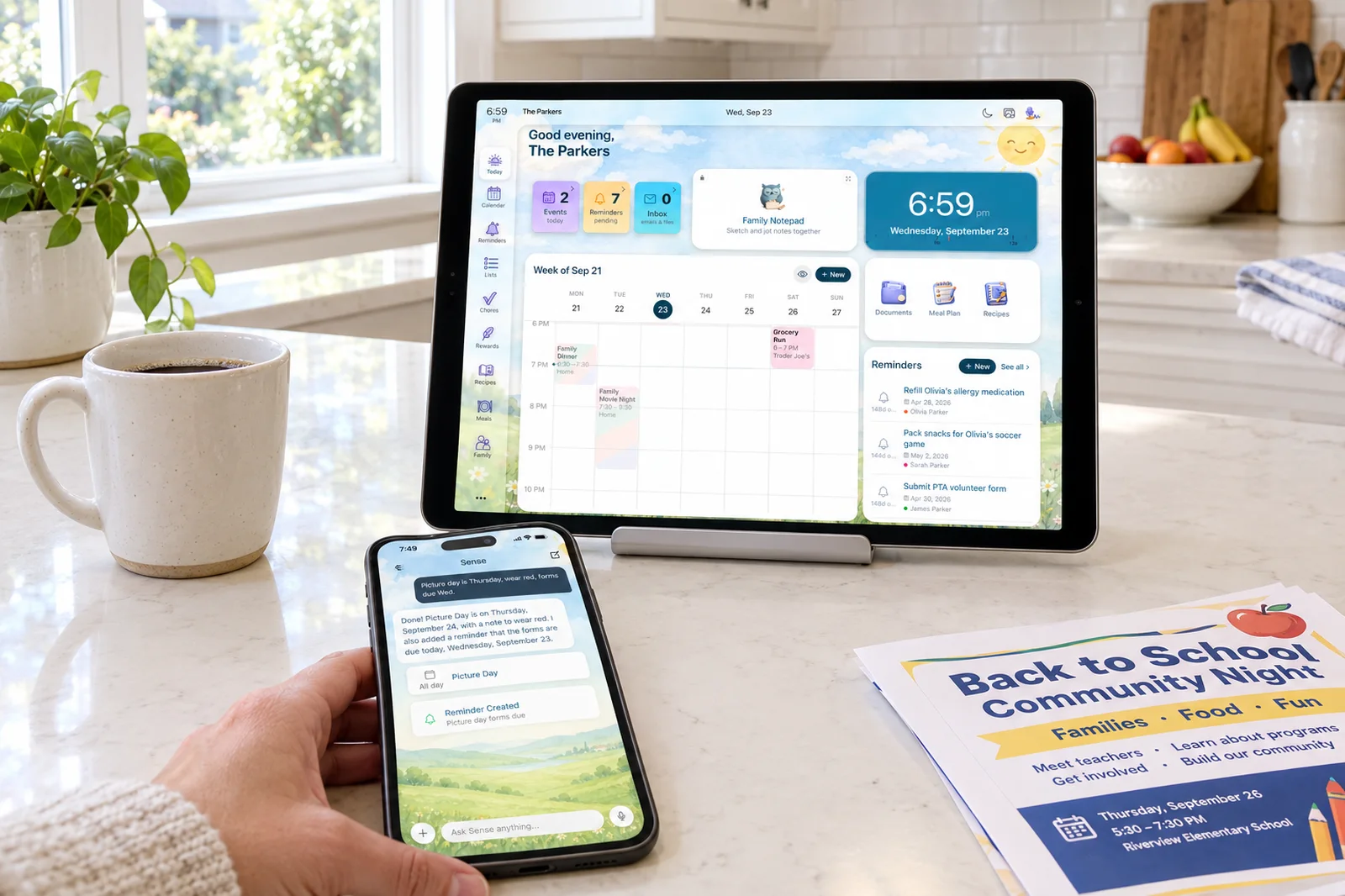
Forward one school email to Sense tonight. The dates land on the family calendar under the right kid, and tomorrow you can ask "what's on Friday?" and get your family's real answer.
Try Sense online

The 4 Best AI Family Assistants
1. Sense - Best AI Family Assistant for the Whole Household
Full disclosure: this is our app. It leads the list because the assistant and the family's shared plan are the same thing, so what you ask for is done where everyone can see it.
It knows your family. Sense keeps one calendar, list set, chore chart, and meal plan for the household, and remembers who each person is: school, grade, activities, allergies. Ask "what's on this weekend?" or "who has pickup Thursday?" and the answer comes from your real schedule.
It does the thing. "Move piano to Thursday at 4." "Add shin guards to the shopping list." "Plan dinners around Saturday's tournament." Sense makes the change and tells you what it did. It also handles the everyday questions: a nut-free lunchbox idea, a rainy-day activity, help with fractions.
It reads what comes in. Forward the school newsletter, the coach's email, or the camp PDF. Forward a class-group message to the Sense contact in your WhatsApp. Snap the flyer on the fridge. Every date, deadline, and what-to-bring is filed under the right kid, linked back to where it came from. Set a Gmail or Outlook rule for the senders that matter and you stop forwarding too.
Everyone sees it. Your partner gets the same calendar and a morning digest. Kids get their own screen in Kid Mode. An old tablet on the counter shows the day. A nanny or grandparent gets a private link with no app or account. You can talk to Sense in the app, by voice, on WhatsApp, through Siri and Alexa, and inside ChatGPT or Claude. Texting it from any phone (Sense Assistant) is coming soon on Premium+. More on Sense as an AI family assistant.
Strengths
- Answers from the family's real calendar, lists, and meal plan
- Makes the change you ask for, shared with everyone
- Reads email, WhatsApp, photos, and PDFs without inbox access
- Chores, rewards, routines, and meal planning included
- iPhone, Android, web, and a kitchen tablet mode on Premium
- One household price, no per-person fees
Limitations
- You forward, or set up auto-forwarding once; it does not scan your inbox on its own
- Texting by SMS or iMessage is not available yet
- English only
2. Ohai - Best Assistant to Text
Ohai calls itself a household manager. You text or talk to its assistant, "O", by SMS or in the app, forward emails, and send screenshots, PDFs, and photos. It keeps a calendar with conflict detection, reminders, assignable to-dos, shared lists, and meal planning with Instacart ordering. It can look up school calendars by ZIP code and help book appointments.
It is the closest to the "assistant in your text thread" idea, and today it is the stronger pick if texting is the only way you want to talk to an assistant. The household side is thinner: the shared calendar and family task coordination need Premium, pricing is per person and monthly on the website, and there are no chores, rewards, routines, or kid screen.
Strengths
- Text or talk to it like a person
- Meal planning with Instacart ordering
- School calendars by ZIP code
Limitations
- Priced per person; shared calendar needs Premium
- No chores, rewards, or kid screen
- No shared display
3. Nori - Best With a Wall Screen You Talk To
Nori is a family organizer first: shared calendar, tasks, chores with star rewards, recipes, a meal plan, and a shopping list. Its AI imports events from photos, forwarded emails, PDFs, and voice, and "Agent Mode" handles multi-step planning. The free app includes a handful of AI uses; unlimited AI needs Plus. The optional Nori Family Hub is a dedicated touchscreen with "Hey Nori" voice.
As an assistant it is strongest on the Hub, where the whole family can talk to it in the kitchen. It does not connect to your inbox, and a nanny or grandparent needs their own Nori account to see the calendar.
Strengths
- Full organizer with chores and meal planning
- Voice on a dedicated display
- Annual AI plan priced like Sense
Limitations
- AI beyond the free allowance needs Plus
- Best experience needs the Hub hardware
- Sitters and grandparents need accounts
4. Fambot - Best Inbox-Connected Briefing
Fambot's App Store name is "Fambot: AI Family Assistant", and it describes itself as a family's AI chief of staff. You connect Gmail or Outlook, Google or Apple Calendar, and the WhatsApp groups you pick, and it reads them for family logistics. Each evening it sends a plan for tomorrow by text or email. You can reply to ask a question or make a change.
Its strength is that you never forward anything. The trade-off is access: it reads your whole inbox. Its own help center says it can't connect to an iCloud inbox and that ParentSquare isn't supported yet. As an assistant it is more of a briefer than something the family asks: the output is a plan for the parents, with no chores, meal plans, or kid screens. The App Store listing shows 5.0 stars from 20 ratings (checked November 28, 2026).
Strengths
- No forwarding after setup
- Reads WhatsApp groups for you
- Evening plan by text you can reply to
- Free during beta
Limitations
- Needs read access to your whole inbox
- No iCloud Mail connection
- A briefing for the parents, not a shared household plan
- No chores, meals, or kid screens; final price unknown
Can ChatGPT, Claude, or Gemini Be Your Family Assistant?
Plenty of parents already use a general AI assistant and wonder if that is enough. For one-off help it is: paste in the six-page newsletter and ask what matters, ask for a week of dinners around Thursday's game, or get help explaining long division.
What a general assistant does not do is keep the family's plan. Nothing it says lands on a calendar your partner sees, nothing reminds the right person on the right day, and next week you paste the newsletter in again. It is one person's chat, and the family's logistics are a shared problem.
You do not have to choose. If you like working in ChatGPT or Claude, you can connect Sense to them: ask "what does Olivia have Thursday?" or "add the field trip to the calendar" there, and it reads and writes your family's real Sense calendar and lists. More in Is there a GPT for families?
How to Pick
Is the assistant for you, or for the family?
If one parent wants a helper in their texts, Ohai or Fambot fits. If the point is that your partner and kids stop asking you what is next, you need shared state: Sense on every phone, Kid Mode, and the kitchen tablet, or Nori with its Hub.
Where does your family's schedule come from?
If it arrives by school email, flyer, and class group chat, pick an assistant that reads those well. Sense and Fambot are built around that; Sense works from what you forward, Fambot from your whole inbox.
How do you want to talk to it?
By text message: Ohai today. On WhatsApp or by voice in an app: Sense. Out loud in the kitchen: Nori's Hub. Inside ChatGPT or Claude: Sense connects to both.
What else should it run?
If chores, allowance, routines, and meal planning matter as much as the calendar, that narrows it to Sense and Nori.
The Bottom Line
Every assistant here will answer a question and add an event. The difference is what it knows and who sees the result. Ohai is a good assistant to text. Nori is a solid organizer with a screen you can talk to. Fambot is the best version of the connect-once briefing.
Sense is the AI family assistant that knows the household and shares the result: it reads what you hand it, answers from your real week, makes the changes you ask for, and puts them where the whole family looks. Try it on the free plan: forward one school email tonight, then ask it what's on Friday.
Forward One School Email. Then Ask Sense What's on Friday.
10 AI actions a month on the free plan. Unlimited on Premium.
Try Sense online
Premium is $6.99/month or $59.99/year for the whole household.
Frequently Asked Questions
What is the best AI family assistant in 2026?
It depends on what you want to hand off. Sense is the best fit if you want an assistant the whole family shares: you ask it about the week or forward it a school email, and it updates one calendar, list set, chore chart, and meal plan that everyone sees. Ohai suits one parent who wants an assistant to text. Nori suits families who want a dedicated wall screen they can talk to. Fambot suits a parent who wants an app to read the inbox and text a plan each evening.
What is a family AI assistant?
A family AI assistant is an app you can ask and hand things to, the way you would a person who helps run the house. It knows the family's calendar, lists, and tasks, answers questions about the week, and makes changes when you ask. The better ones also read school and activity emails, so the schedule they answer from is already filled in.
Is ChatGPT a good family assistant?
For one-off help, yes: summarizing a newsletter you paste in, drafting a meal plan, or explaining homework. On its own it does not keep a shared family calendar, remind your partner, or run chores, and your family cannot see what it told you. You can connect Sense to ChatGPT or Claude so they read and update your family's real calendar and lists.
Do AI family assistants need access to my inbox?
Some do. Fambot connects to Gmail or Outlook and reads the inbox. Sense never connects to your inbox: it reads only what you forward, and a Gmail or Outlook rule for school and team senders makes that hands-off. Ohai and Nori both accept forwarded emails.
How much does an AI family assistant cost?
Sense is free with 10 AI actions a month, or $6.99 a month or $59.99 a year for the whole household. Nori AI Plus is $7.99 a month or $59.90 a year. Ohai Premium starts at $9.99 a month for one person. Fambot is free while in beta, with paid tiers to come. ChatGPT Plus is $20 a month per person.
Related reading: AI family assistant · Sense vs Ohai · Best AI family organizer apps 2026 · Best AI chief of staff for families