Quick Summary
- On its own, ChatGPT has no calendar and forgets your schedule the moment the chat ends. Pasting your week in works once and then goes stale.
- ChatGPT's Google Calendar connector lets it read one Google account. It doesn't know which kid an event belongs to, and it can't touch a shopping list, a reminder, or a chore.
- A family organizer plugin closes the gap. Connect Sense and ChatGPT can read and update the shared family calendar, lists, reminders, meal plan, and chores, with everything landing where your partner and kids already look.
- Setup is a sign-in, not a token or a copy-paste. Settings, Plugins, Sense, Allow. Two minutes.
You already ask ChatGPT things all day. Draft the email to the coach. Explain long division the way the school does it now. What's a dinner that uses the half bag of spinach. So at some point you type "what's on the family calendar this weekend?" and it answers, politely, that it has no idea.
It's not being difficult. It really doesn't know. This post is about the fastest way to fix that, what changes once it can see the calendar, and where the limits still are. We make Sense, one of the plugins involved, so read the recommendations knowing where we sit.
Can ChatGPT manage a family calendar?
Not by itself. ChatGPT doesn't have a calendar, and it doesn't carry your family's schedule from one conversation to the next. There are three ways to give it one, and they are not equal.
1. Paste your week in. Copy the events out of Google Calendar or Cozi and paste them into the chat. ChatGPT will happily reason about them: find the conflict, suggest who drives, draft the text to the other parent. Then the chat ends and it knows nothing again. Fine for a one-off planning session, useless as a system.
2. ChatGPT's Google Calendar connector. ChatGPT can connect to a Google account and read its calendar, so "what do I have Thursday?" works for the events in that one account. Two problems for a family. It reads one person's calendar, not the shared family view with each kid's color on it. And it is a calendar only: no shopping list to add milk to, no reminder to set, no chores to check, no meal plan to ask about.
3. A family organizer plugin. This is the version that behaves the way the question expects. Connect a family organizer that already holds the calendar, the lists, the reminders, the chores, and the meals, and ChatGPT can read all of it and change it. You ask in plain English; the result shows up in the app your partner and kids look at. That is what the rest of this guide walks through, using Sense.
What ChatGPT can do once Sense is connected
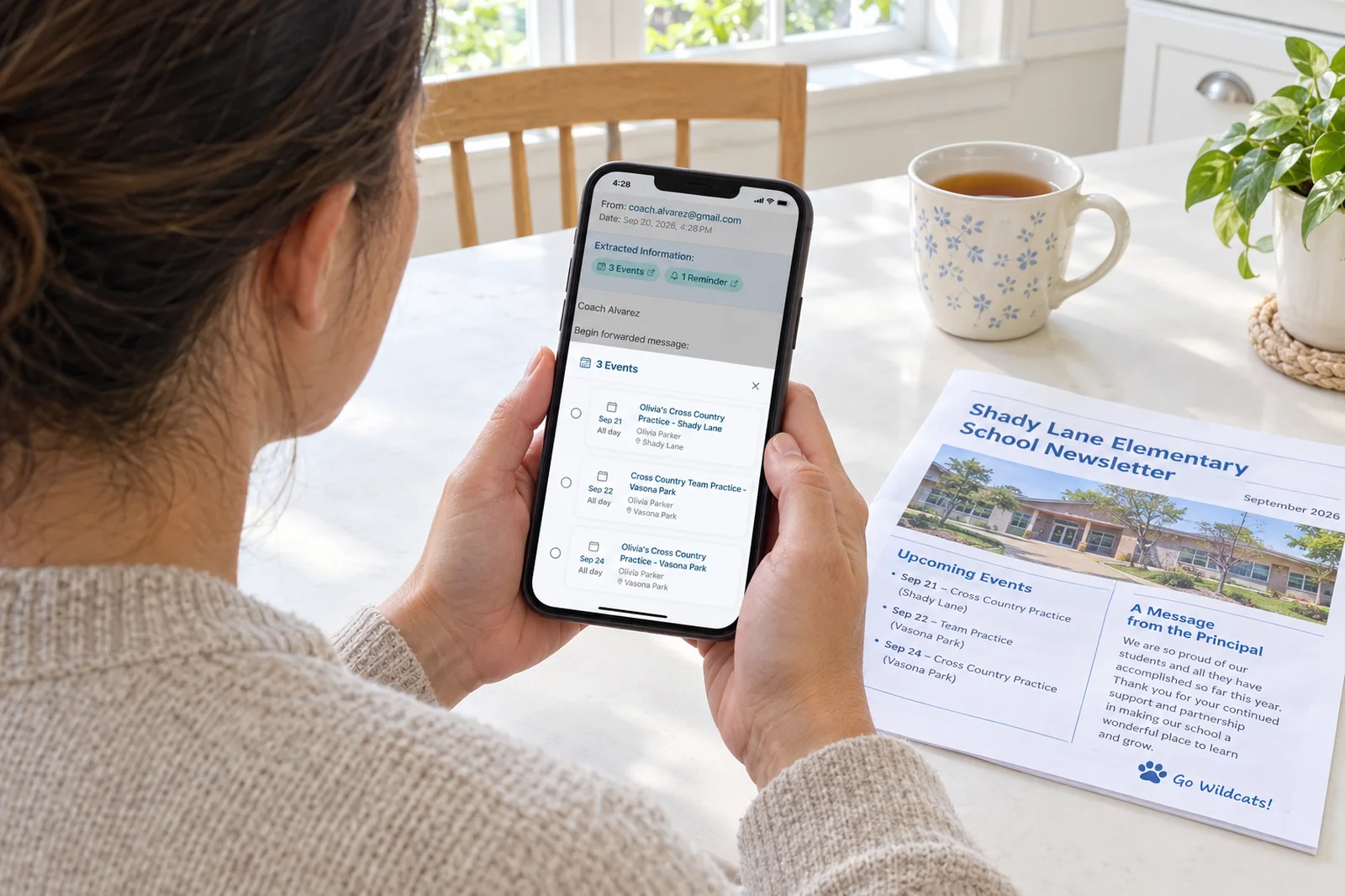
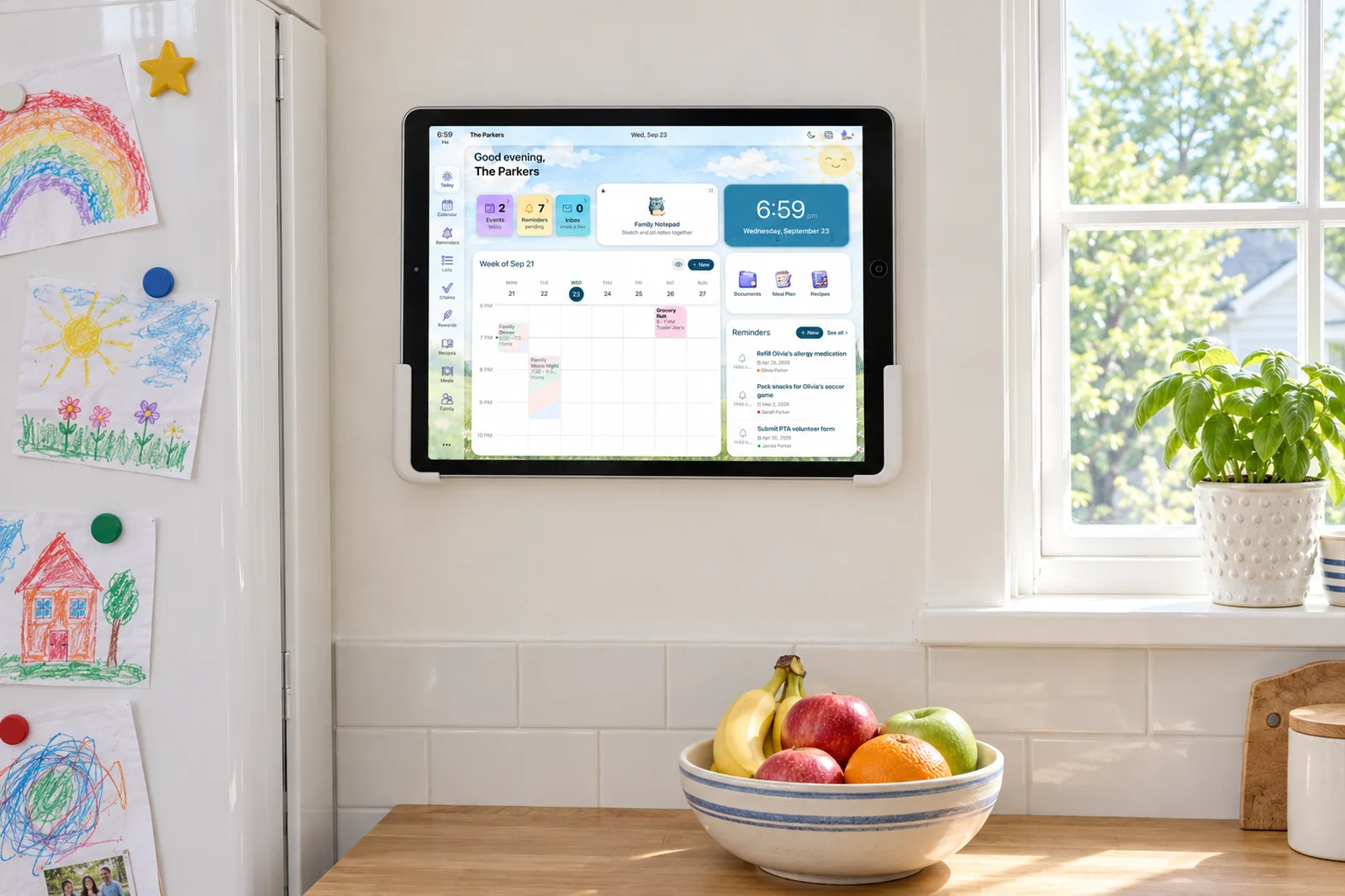
Sense is a family organizer: one shared calendar with a color per person, shopping and to-do lists, reminders, chores and routines, a meal plan and recipe box, birthdays, and a kitchen tablet display we call the Hub. Its main trick is that it fills the calendar from the school and activity emails you forward to it, so the dates get in without you typing them.
Connect it to ChatGPT and the assistant gets the same view you have. Here is a real exchange from a family account, unedited apart from the family being our demo household:
- What's on the family calendar this weekend?
- Here's the family calendar for this weekend, September 26 to 27. Saturday: 9:00 AM San Diego Zoo, guided bus tour at 9:30. 3:00 to 5:00 PM Ethan's playdate with Max at home. 6:00 to 7:00 PM grocery run at Trader Joe's. Sunday: 10:30 to 11:15 AM Ethan's dentist appointment. 11:00 AM check out of Hotel del Coronado. 2:25 to 5:20 PM train from San Diego to Los Angeles. The dentist appointment and hotel checkout overlap by 15 minutes.
- Add soccer practice for Ethan next Tuesday at 4pm.
- Added Ethan's soccer practice for Tuesday, September 29, 4:00 to 5:00 PM.
- Put milk, eggs, and bananas on the shopping list.
- Added milk, eggs, and bananas to the August Grocery List.
- Remind me Thursday morning to sign the field trip form.
- Set a reminder to sign the field trip form for Thursday, October 1 at 9:00 AM.
Three things worth noticing. It caught the overlap between the dentist and the hotel checkout without being asked. "Ethan" resolved to the right kid, so the event shows up in his color, on his column on the Hub, without you picking him from a list. And every one of those changes is now in Sense, where your partner sees it on their phone and the kids see it on the kitchen tablet. Nobody else in the house needs ChatGPT for that to be true.
Try the Calendar That Fills Itself
Sense reads the school email you forward and puts the dates on the family calendar. Then ask ChatGPT about your week, or just open the app. Free to start, no card.
Try Sense Online or get the app:

How to add Sense to ChatGPT
There is nothing to copy. The sign-in is the connection.
- In ChatGPT, open Settings, then Plugins, then Browse plugins. Search for Sense and choose Connect.
- ChatGPT sends you to Sense. Sign in with the email and password you use in the app. If you don't have an account yet, it takes a minute at app.getsense.ai.
- Read what ChatGPT will be able to do (view your family's calendar, reminders, lists, meals, and chores; add and change them) and press Allow. You land back in ChatGPT, connected.
- In a chat, mention Sense, or just ask about your family. ChatGPT picks the plugin up when the question is about your calendar, lists, or kids.
Sense is rolling out to ChatGPT's plugin directory. If it hasn't appeared in your search yet, check back in a few days, or ask us at support@getsense.ai and we'll tell you the moment it's live. The same plugin works in Claude, under Customize, then Connectors; here is the Claude version. The short version of these steps lives on its own page.
Prompts that actually save a Tuesday
The generic advice is "ask it anything." The useful advice is the handful of questions you ask every week anyway, now with an answer that comes from the real calendar.
The calendar
- “What's on the family calendar this weekend?”
- “Does anything on Thursday overlap?”
- “Add soccer practice for Ethan every Tuesday at 4 through November.”
- “Move Olivia's piano lesson to 5:30.”
Lists and reminders
- “Put milk, eggs, and bananas on the shopping list.”
- “What's still on the Costco list?”
- “Remind me Thursday morning to sign the field trip form.”
- “What reminders are due this week?”
Meals and chores
- “What's for dinner this week?”
- “Plan Wednesday's dinner from a saved recipe and add the ingredients to the list.”
- “Which chores are still open for the kids today?”
- “Mark Ethan's "feed the dog" chore done.”
A note on the last group. In Sense, adding or changing chores, routines, meal plans, and rewards is part of Premium. On the free plan ChatGPT can still read them and answer "what's for dinner", it just can't rewrite the plan.
What ChatGPT can't do, even connected
Honest limits, so you don't discover them at 7:45 on a school morning.
- It acts as you, only. It sees what you see in Sense and nothing more. It can't sign in for your partner or peek at a different family.
- It doesn't read your email. The part of Sense that turns a six-page school newsletter into three calendar events happens in Sense, when you forward the email. ChatGPT sees the result on the calendar, not the inbox.
- It asks before it deletes, or it should. "Delete the event" with no name gets a question back. That is by design. Say which one.
- Custom, unreviewed plugins carry a warning label in ChatGPT until they are listed in the directory. Normal, and the reason we submitted Sense for review.
Privacy: what happens to your family's data
Connecting means Sense issues ChatGPT a token that lets it act as you. ChatGPT never sees your Sense password. Everything it reads or writes goes through the same permissions your own account has, and each request is logged on our side.
You can see the connection, and cut it, in Sense under Settings, then Connected apps. Disconnecting revokes access immediately, including anything in progress. Nothing ChatGPT already added is removed; it stays on your calendar like any other event.
What we can't control is what ChatGPT keeps of the conversation itself. Treat the chat the way you'd treat any ChatGPT chat: the questions and answers live in your ChatGPT history under OpenAI's policies, not ours.
Is it worth setting up?
If you already keep the family in Sense, yes, because it's two minutes and you gain a place to ask about the week from wherever you already are. If you are choosing a family organizer partly for this, the thing to check is whether the app can be written to, not just read. Reading your calendar is table stakes now. Being able to say "add it for Ethan" and have it land on the kitchen tablet in his color is the part that takes something off your plate.
And if what you actually want is for the calendar to fill itself so there's less to ask about in the first place, that's the older, quieter feature. Forward the school email. The dates are on the calendar before you've finished reading it.
Start with the email, then ask ChatGPT about it
Forward one school newsletter to Sense and watch the dates land. Connect ChatGPT after, or don't. The calendar is full either way.
Try Sense Online or get the app:
Frequently asked questions
Does ChatGPT have a family calendar?
No. ChatGPT has no calendar of its own and no memory of your family's schedule between chats. To ask it about your week you connect a calendar to it. Its built-in Google Calendar connector can read events from one Google account; a family organizer plugin like Sense gives it the shared family calendar plus lists, reminders, chores, and meals, and lets it add and change things.
Can ChatGPT add events to my family calendar?
Yes, once a plugin that can write to your calendar is connected. With the Sense plugin you can say "add soccer practice for Ethan next Tuesday at 4" and the event appears on the shared family calendar, assigned to Ethan, for everyone in the family to see.
Is the Sense plugin for ChatGPT free?
The plugin is included with every Sense account. Sense's free plan includes 10 AI actions a month, and requests made through ChatGPT draw from that same allowance. Sense Premium, $6.99 a month or $59.99 a year, removes the cap and unlocks changes to chores, routines, meal plans, and rewards. Full pricing.
Does my partner need ChatGPT too?
No. Whatever you add through ChatGPT lands in Sense, and your partner sees it in the Sense app, on the web, or on the Sense Hub display in the kitchen, whether or not they use ChatGPT. If they do use ChatGPT, they connect their own Sense account.
What can ChatGPT see once I connect Sense?
Only what you can see in Sense, and only while you are signed in. It acts as you, never gets your Sense password, and cannot sign in for other family members. You can disconnect it at any time from Settings, then Connected apps, in Sense, and it loses access immediately.