The Short Answer
- Free on Skylight: chores and routines, one-off or repeating, Up for Grabs chores anyone can claim, late chores that carry over, and skipping a day.
- Needs Plus ($79/year): stars on chores and the rewards kids spend them on.
- Where it falls short: kids tick a chore and the stars land with no parent check. Stars never become money. Chores get an emoji, not a picture. Kids can't log in on their own phone or tablet, so their own screen means a Skylight Buddy at $139.99 or more per child.
- In Sense: parents approve chores before feathers land, other days can be locked, feathers convert to real allowance, chores have pictures, and kids get their own login or use Apple Watch. All of that is Sense Premium ($59.99/year). Sense chores are not free.
How Skylight's chore chart works
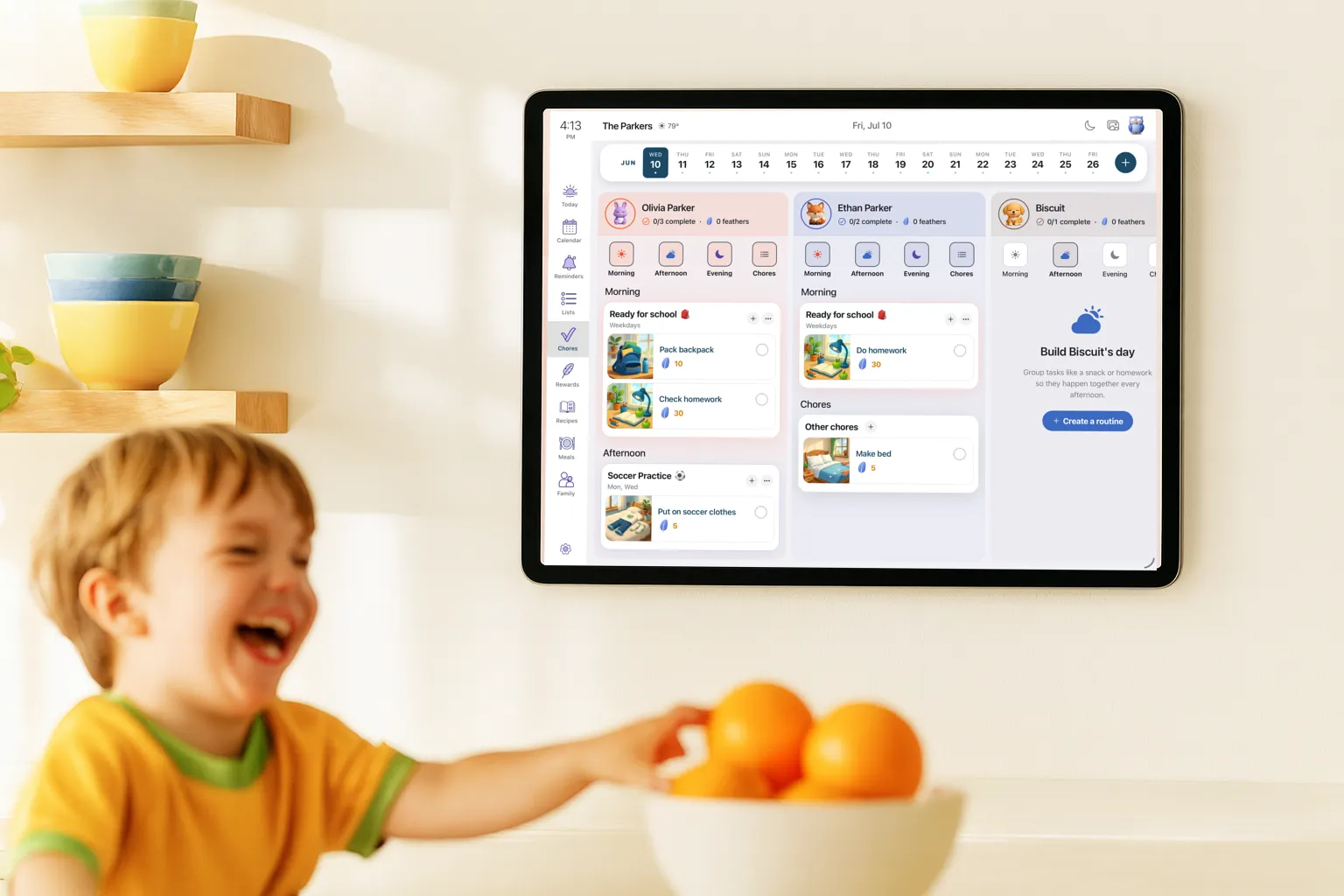
On a Skylight Calendar, chores live in the Tasks tab, with a column per person. You add them on the screen or in the Skylight app, give each one an emoji, and set it to happen once or repeat every few days or weeks. Since August 2026 a chore can also repeat a set time after it was last done, which suits jobs like changing the sheets.
Routines are the same idea for daily habits, sorted into morning, afternoon and evening. The screen shows the right group for the time of day. Since June 2026, Track Habit counts streaks on routines.
A few 2026 additions fixed long-standing gaps. Up for Grabs chores (April) can be claimed by whoever does them first. Skip (April) lets a kid miss a repeating chore without breaking a streak. Parents can get a notification when a chore is done (August). A chore assigned to several kids can now be edited for all of them at once (August). Chores that aren't done carry over to the next day with a red late marker.
What's free and what needs Plus
| Feature | Free | Plus ($79/yr) |
|---|---|---|
| Chores and routines | Yes | Yes |
| Up for Grabs, skip, late chores carry over | Yes | Yes |
| Stars on chores | No | Yes |
| Rewards kids redeem stars for | No | Yes |
| Rewards on a Skylight Buddy | No | Yes (or Buddy Plus, $39/yr) |
Stars and rewards behind Plus is the complaint parents raise most. One parent who returned the device called the rewards paywall "a cash grab" on Trustpilot. For the rest of what Plus covers, see what's free vs Plus.
No approval before the stars land
On Skylight, a kid taps the circle and the chore is done. If it carries stars, they count immediately. Skylight's help center describes no step where a parent confirms the chore first. The only parent check is on a Skylight Buddy, where redeeming a reward shows a QR code for a parent to scan.
Kids notice. A Buddy review put it plainly: "washing the dishes" turned into "washing one spoon".
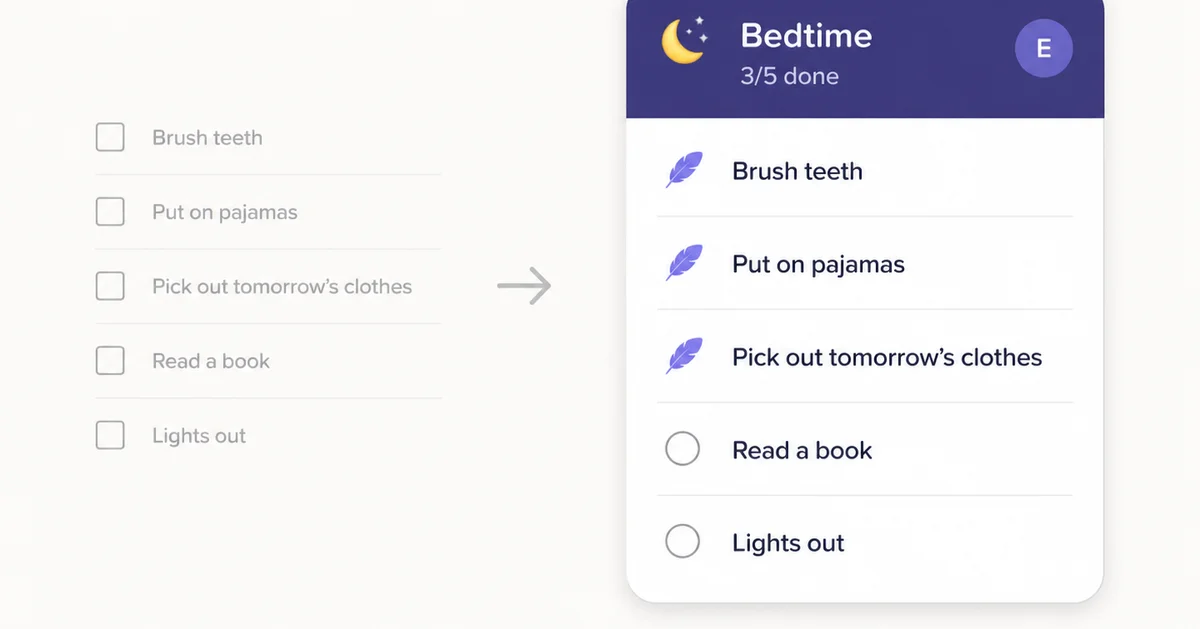
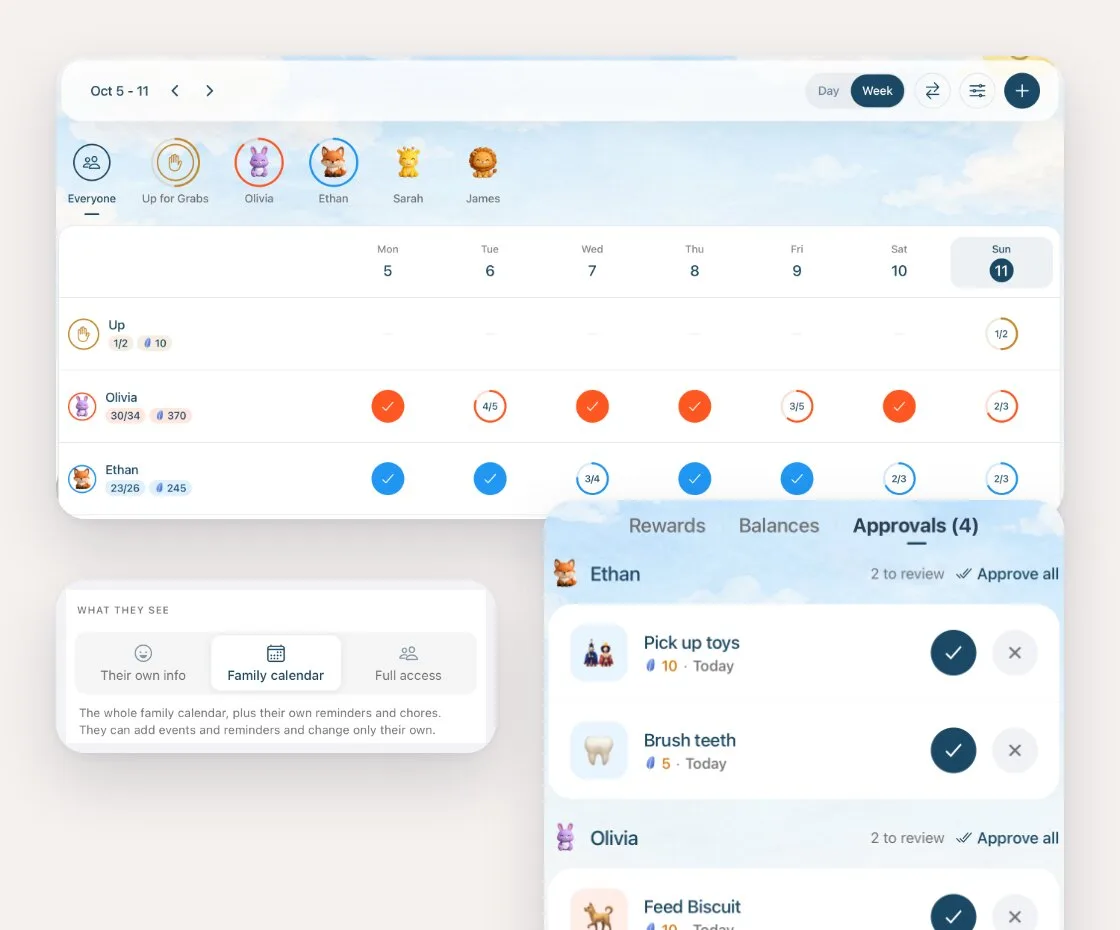
In Sense, you can turn on approval so a ticked chore waits for a parent before the feathers land. Approvals collect in one list per kid. Approve one, reject one, or approve everything at once after you've checked the kitchen.
Nothing stops a kid ticking tomorrow's chores
Kids figure out fast that tomorrow's chores are one swipe away. Skylight's help center doesn't describe any way to stop a kid checking off another day's chores. Since August, a late chore is credited to the day it was ticked, which helps the record, but nothing stops the tap itself.
Sense has a Lock other days setting. With it on, ticking a chore on any day but today asks for the parent PIN, and a kid signed in on their own account can't do it at all. It's off by default, so families who like catching up on yesterday can leave it off.
Stars, not money
Skylight rewards are stars, and stars buy whatever rewards you set up: screen time, a treat, a later bedtime. There's no allowance, no money value and no balance. Parents who pay pocket money keep track separately. One family described their system: once the kids have earned all their stars for the week, "they get their allowance."
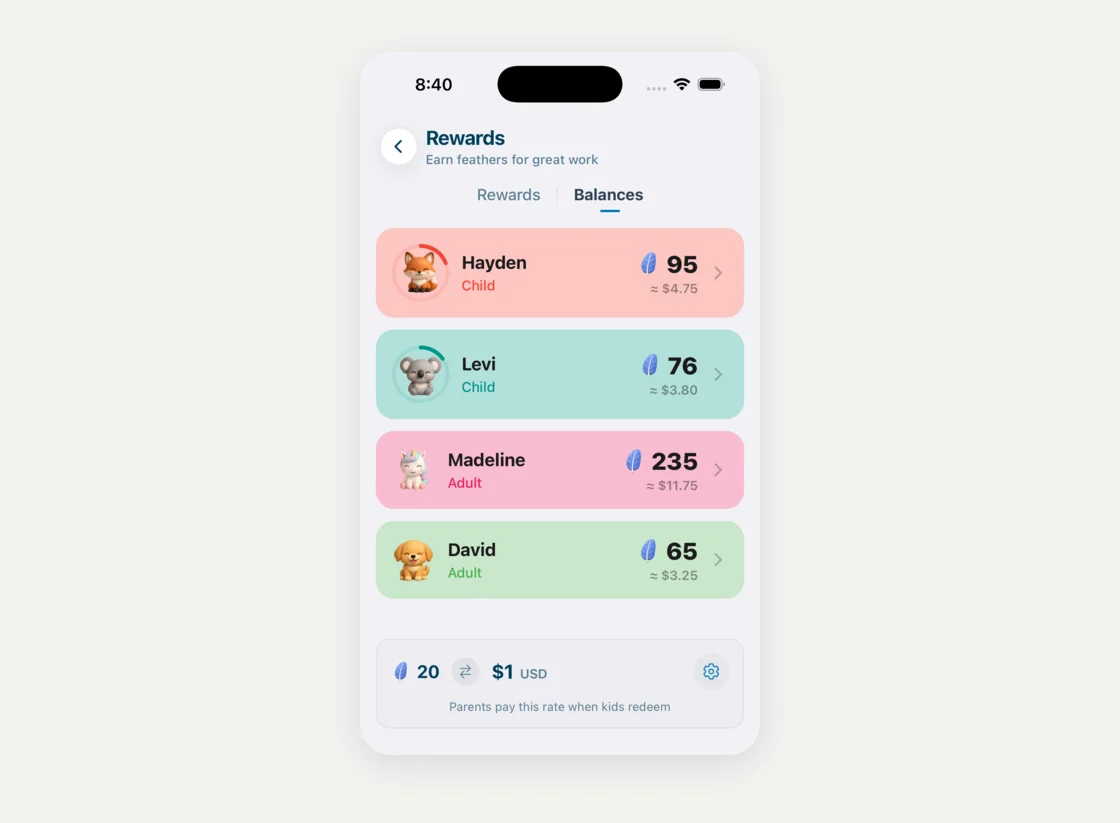
Sense uses feathers instead of stars, and you set what a feather is worth, for example 20 feathers to $1. Each kid's balance shows in feathers and in dollars, so "how much do I have?" has an answer, and a reward catalog sits alongside for the non-money treats.
Emoji, not pictures
A Skylight chore gets an emoji and an optional description. That works for "Feed the dog" with a dog emoji. It's harder for a four-year-old to tell "Pack backpack" from "Check homework" when both are a small icon.
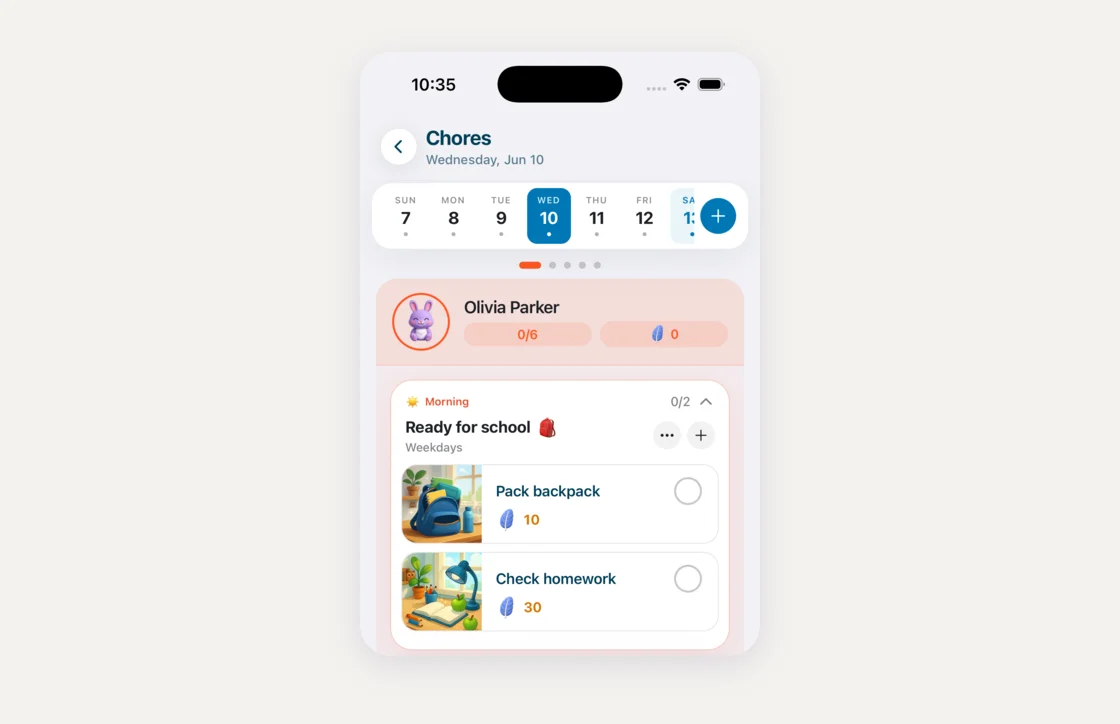
Sense chores and routine steps can have a full picture: pick one from the template set, upload a photo of the actual backpack, or have Sense draw one. Kids who can't read yet go by the picture.
One screen, or a device per kid
Skylight profiles are names and colors on the shared screen, not logins. Parents can check off chores from the Skylight app, but a kid has no account of their own. If you want each kid to have their own chore screen, Skylight's answer is the Skylight Buddy: a bedside device for ages 4 to 10 at $139.99 to $159.99 each, with Buddy Plus ($39/year, or included with Calendar Plus) for rewards and timers.
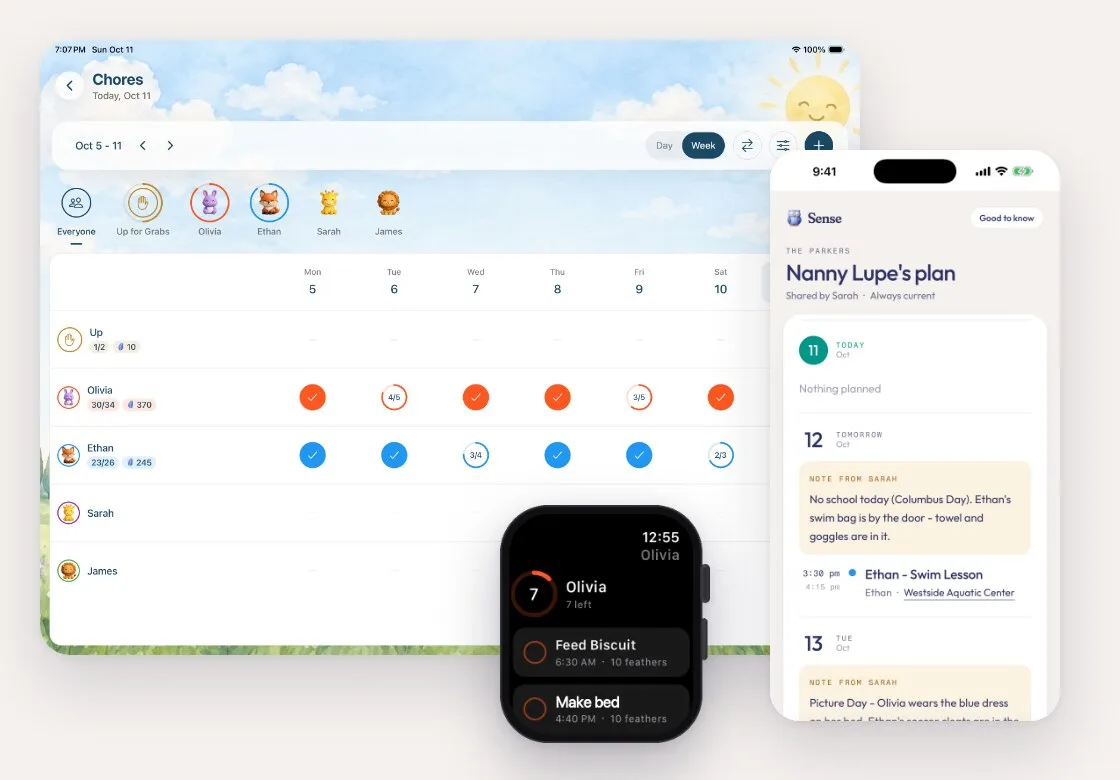
In Sense, kids can have their own login on a phone or tablet the family already owns, set to see only their own chores or the whole family calendar. A shared tablet can run Kid Mode. Kids with an Apple Watch can tick chores off their wrist. And the same chores show on Sense Hub if you put a tablet on the kitchen wall.
Chores with approval, real allowance and pictures
Set up your kids' chores in a few minutes, or ask Sense to make a chart for their ages. Free to try, no credit card.
Try Sense Online or get the app:

4.8 on the App Store 2,000+ families
Where Skylight is ahead
- It's free. Skylight's chores and routines cost nothing beyond the screen. Sense chores, routines, rewards and allowance are all part of Premium.
- Late chores carry over. An unfinished Skylight chore moves to the next day marked late. In Sense, a missed day stays on that day.
- More repeat options in the app. Skylight repeats every few days or weeks, or a set time after completion. The Sense chore editor offers every day or chosen weekdays; other patterns go through Sense chat.
- Completion notifications. Skylight can tell a parent when a chore is done. Sense doesn't send chore notifications yet.
- Streaks and timers. Skylight counts routine streaks, and Buddy has visual timers. Sense has neither.
Skylight vs Sense chores, side by side
| Chores | Skylight |  Sense Sense |
|---|---|---|
| Chores and routines | Free | Premium |
| Points and rewards | Stars, with Plus | Feathers, with Premium |
| Parent approves before points land | No | Yes |
| Lock other days | Not documented | YesPIN for parents, kids blocked |
| Allowance in real money | No | Yesyou set the rate |
| Chore pictures | Emoji | Picturestemplate, your photo, or generated |
| Kid's own login | No | Yes |
| Kid's own screen | Buddy, $139.99+ each | A phone, tablet or Apple Watch you own |
| Up for Grabs chores | Yes | Yes |
| Late chores carry over | Yes | No |
| Completion notifications | Yes | No |
| Streaks and timers | Yes | No |
| Cost | $299.99 screenplus $79/yr for stars | $59.99/yearon devices you own |
Which one fits your family
If your kids are young, love tapping the big screen, and stars are enough motivation, Skylight's free chore chart does the job, and Plus adds rewards. If you need to know the dishes were actually done, pay allowance, or want older kids to manage chores from their own phone, that's where Sense fits. You can try it with this week's chores before deciding.
Skylight chore chart FAQ
Are Skylight Calendar chores free?
Yes. Chores and routines, including repeating chores, Up for Grabs and skips, work without a subscription. Stars on chores and the rewards kids redeem them for need Skylight Plus at $79/year.
Can parents approve chores on Skylight?
Skylight's help center describes no approval step for finished chores. When a kid checks off a chore, any stars count right away. The only parent check is when a kid redeems a reward on a Skylight Buddy, which shows a QR code for a parent to scan.
Does Skylight support allowance or money?
No. Skylight rewards use stars, which kids spend on rewards you create. There's no money value or allowance balance. Sense lets you set a feather-to-money rate, such as 20 feathers to $1, and shows each kid's balance in both.
Can kids check off Skylight chores on their own device?
Skylight profiles aren't logins, so kids don't get their own account. Parents can check off chores in the Skylight app. For a kid's own screen, Skylight sells the Buddy, $139.99 to $159.99 per child, with Buddy Plus at $39/year for rewards and timers.
What happens to missed chores on Skylight?
Unfinished chores carry over to the next day with a red late marker until they're done. Since August 2026, a late chore counts toward the day it was ticked. Routines reset each day, and a kid can skip a repeating chore without breaking a streak.
Does Skylight have routines?
Yes. Routines are daily or weekly tasks grouped into morning, afternoon and evening, and the screen shows the right group for the time of day. Track Habit counts streaks on routines. Each routine item is a single task with an emoji.
Try it with this week's chores
Approval, allowance and picture chores on the phones and tablets you already have. Free to try, no credit card.
Try Sense Online or get the app:
Related reading: Skylight Calendar 2 review · Skylight subscription: what's free vs Plus · Best family chore apps · Free printable chore chart by age