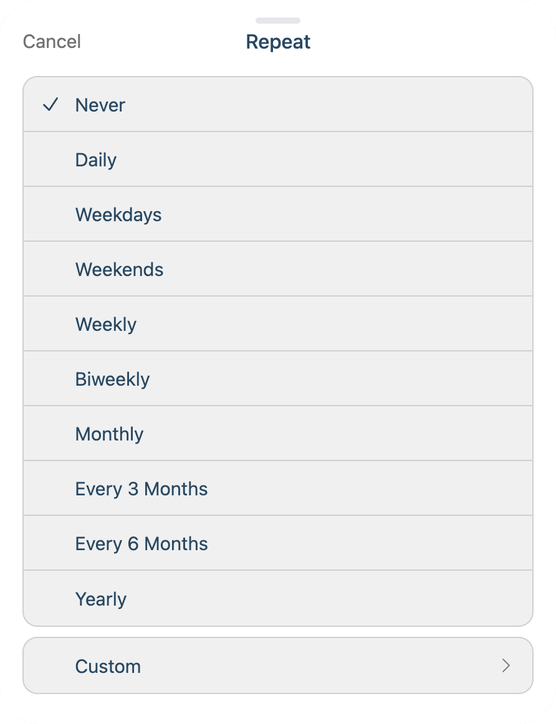
Pick how often it comes back, or Custom for anything else, like every 3 days.
Some reminders come back: "bring your Chromebook" every school morning, bins out on Mondays, a refill on the 1st. Set one up once and Sense brings it back each time.
Open a new reminder, or tap Edit on an existing one.
Set the due date (and time, if you like) for the first time it should nudge. If that day isn't one it repeats on (Weekdays set on a Saturday), Sense moves it to the first day that is.
Tap Repeat and pick Daily, Weekdays, Weekends, Weekly, Biweekly, Monthly, Every 3 Months, Every 6 Months or Yearly. Custom covers the rest, like every 3 days or Tuesdays and Thursdays.
To stop on a date, tap End Repeat and choose On Date. Leave it on Never to keep it going.
How it works day to day
A repeating reminder shows only its next time, so your list doesn't fill up with copies.
Tick it and it moves to the next time. Undo on the message that appears puts it back.
A day that passes without a tick moves on by itself, so a repeating reminder never shows as overdue.
No school tomorrow? Open the reminder and tap Skip to jump to the time after.
It notifies at its time each day it's due, without the evening-before heads-up a one-off all-day reminder gets.
You can also ask the assistant: "remind Maya every school day at 7:15 to bring her Chromebook", "skip it tomorrow" or "stop repeating the bins reminder".