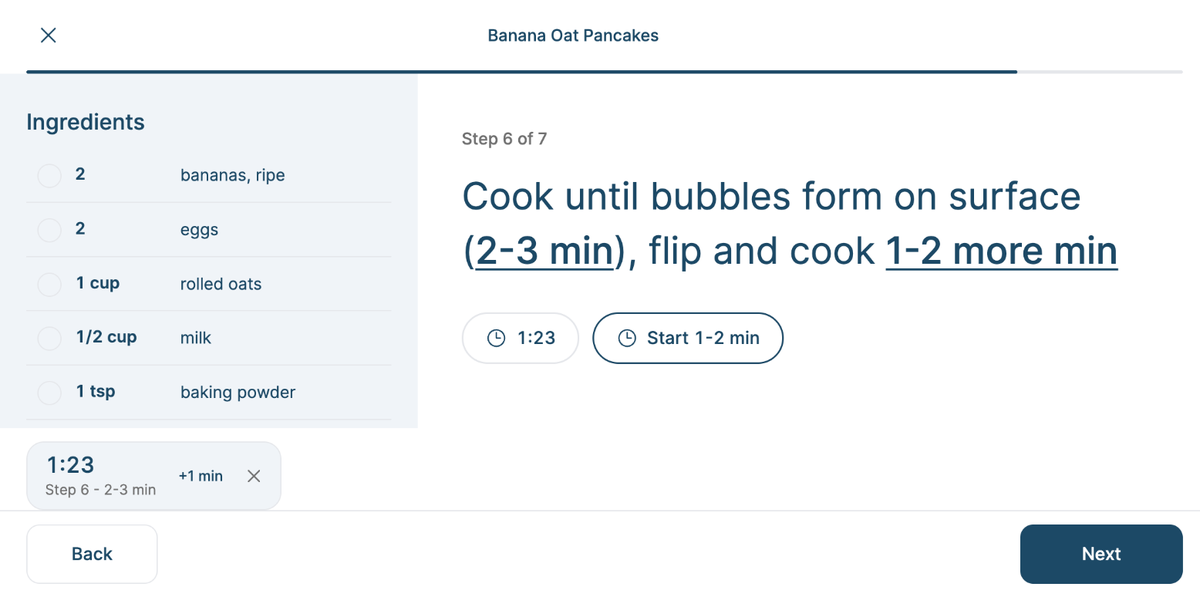
Cook mode shows one step at a time in big, easy-to-read text, so you can follow along from across the counter with flour on your hands.
Open a recipe and tap Start cooking.
Swipe, or tap Next and Back, to move between steps. On the web, the arrow keys work too.
On the last step, tell Sense How was it? and tap Mark as made, or close without marking.
Timers right in the steps
Times in a step, like "simmer 10-12 minutes," are underlined. Tap one to start a timer. Run as many as you need - they sit in a tray at the bottom, where you can add a minute or cancel. Sense alerts you when one finishes, even if you've switched to another app. For a range, the timer starts at the shorter time, so you can check early.
The right amounts for each step
Each step shows the ingredients it uses, at the servings you picked on the recipe.
On a phone, tap Ingredients for the full checklist. On a tablet, the web, and Sense Hub, ingredients sit beside the steps.
Hands-free
The screen stays on while you cook. Opened from a voice conversation, you can say "next step," "go back," or "step four" to move along.